1
2
3
4
5
6
7
8
9
10
11
12
13
14
15
16
17
18
19
20
21
22
23
24
25
26
27
28
29
30
31
32
33
34
35
36
37
38
39
40
41
42
43
44
45
46
47
48
49
50
51
52
53
54
55
56
57
58
59
60
61
62
63
64
65
66
67
68
69
70
71
72
73
74
75
76
77
78
79
80
81
82
83
84
85
86
87
88
89
90
91
92
93
94
95
96
97
98
99
100
101
102
103
104
105
106
107
108
109
110
111
112
113
114
115
116
117
118
119
120
121
122
123
124
125
126
127
128
129
130
131
132
133
134
135
136
137
138
139
140
141
142
143
144
145
146
147
148
149
150
151
152
153
154
155
156
157
158
159
160
161
162
163
164
165
166
167
168
169
170
171
172
173
174
175
176
177
178
179
180
181
182
183
184
185
186
187
188
189
190
191
192
193
194
195
196
197
198
199
200
201
202
203
204
205
206
207
208
| import numpy as np
import pandas as pd
import matplotlib.pyplot as plt
import seaborn as sns
from scipy.optimize import minimize
from matplotlib.cm import get_cmap
np.random.seed(42)
assets = ['Stocks', 'Bonds', 'Real Estate', 'Commodities']
n_assets = len(assets)
expected_returns = np.array([0.10, 0.05, 0.08, 0.12])
volatilities = np.array([0.20, 0.08, 0.15, 0.25])
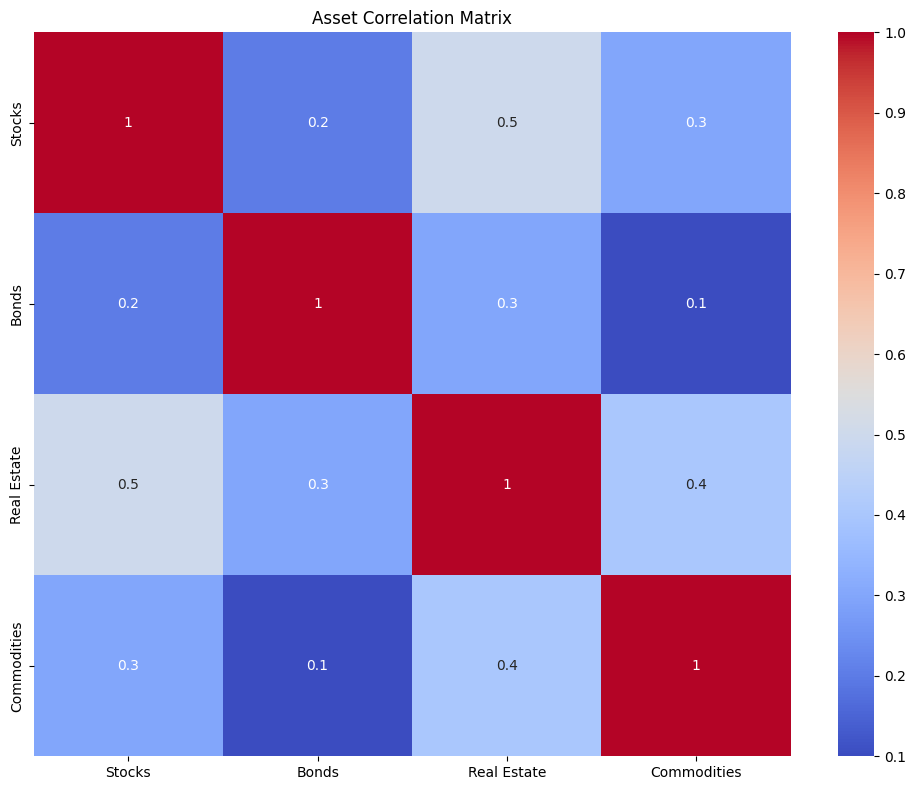
correlation_matrix = np.array([
[1.00, 0.20, 0.50, 0.30],
[0.20, 1.00, 0.30, 0.10],
[0.50, 0.30, 1.00, 0.40],
[0.30, 0.10, 0.40, 1.00]
])
covariance_matrix = np.zeros((n_assets, n_assets))
for i in range(n_assets):
for j in range(n_assets):
covariance_matrix[i, j] = correlation_matrix[i, j] * volatilities[i] * volatilities[j]
plt.figure(figsize=(10, 8))
sns.heatmap(correlation_matrix, annot=True, cmap='coolwarm', xticklabels=assets, yticklabels=assets)
plt.title('Asset Correlation Matrix')
plt.tight_layout()
plt.show()
risk_free_rate = 0.02
def portfolio_performance(weights):
returns = np.sum(weights * expected_returns)
volatility = np.sqrt(np.dot(weights.T, np.dot(covariance_matrix, weights)))
return returns, volatility
def negative_sharpe_ratio(weights):
returns, volatility = portfolio_performance(weights)
sharpe_ratio = (returns - risk_free_rate) / volatility
return -sharpe_ratio
constraints = {'type': 'eq', 'fun': lambda x: np.sum(x) - 1}
bounds = tuple((0, 1) for _ in range(n_assets))
initial_weights = np.array([1/n_assets] * n_assets)
result = minimize(negative_sharpe_ratio, initial_weights, method='SLSQP',
bounds=bounds, constraints=constraints)
optimal_weights = result['x']
optimal_returns, optimal_volatility = portfolio_performance(optimal_weights)
optimal_sharpe = (optimal_returns - risk_free_rate) / optimal_volatility
print("Optimal Portfolio Weights:")
for asset, weight in zip(assets, optimal_weights):
print(f"{asset}: {weight:.4f} ({weight*100:.2f}%)")
print(f"\nOptimal Portfolio Performance:")
print(f"Expected Annual Return: {optimal_returns:.4f} ({optimal_returns*100:.2f}%)")
print(f"Annual Volatility: {optimal_volatility:.4f} ({optimal_volatility*100:.2f}%)")
print(f"Sharpe Ratio: {optimal_sharpe:.4f}")
total_investment = 10000
investment_amounts = optimal_weights * total_investment
print(f"\nCapital Allocation for ${total_investment}:")
for asset, amount in zip(assets, investment_amounts):
print(f"{asset}: ${amount:.2f}")
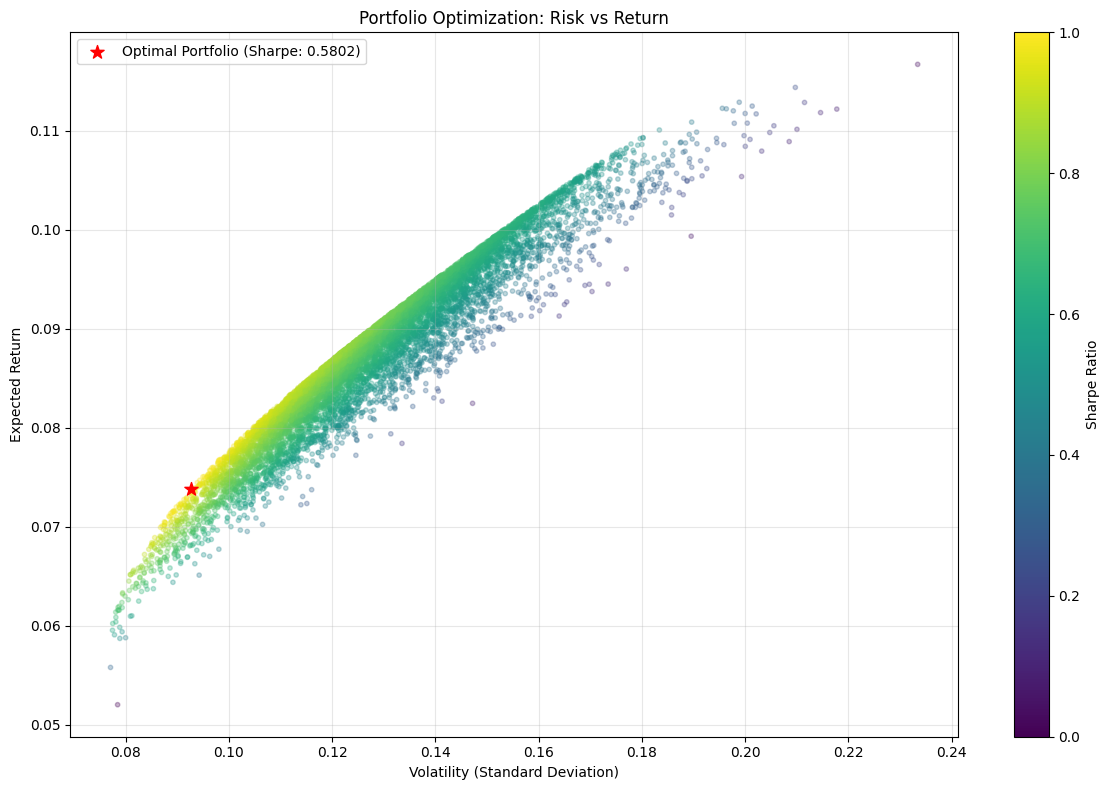
num_portfolios = 10000
results = np.zeros((3, num_portfolios))
all_weights = np.zeros((num_portfolios, n_assets))
for i in range(num_portfolios):
weights = np.random.random(n_assets)
weights = weights / np.sum(weights)
all_weights[i, :] = weights
portfolio_return, portfolio_volatility = portfolio_performance(weights)
results[0, i] = portfolio_return
results[1, i] = portfolio_volatility
results[2, i] = (portfolio_return - risk_free_rate) / portfolio_volatility
plt.figure(figsize=(12, 8))
plt.scatter(results[1, :], results[0, :], c=results[2, :], cmap='viridis',
s=10, alpha=0.3, marker='o')
plt.scatter(optimal_volatility, optimal_returns, c='red', s=100, marker='*',
label=f'Optimal Portfolio (Sharpe: {optimal_sharpe:.4f})')
plt.colorbar(label='Sharpe Ratio')
plt.xlabel('Volatility (Standard Deviation)')
plt.ylabel('Expected Return')
plt.title('Portfolio Optimization: Risk vs Return')
plt.legend()
plt.grid(True, alpha=0.3)
plt.tight_layout()
plt.show()
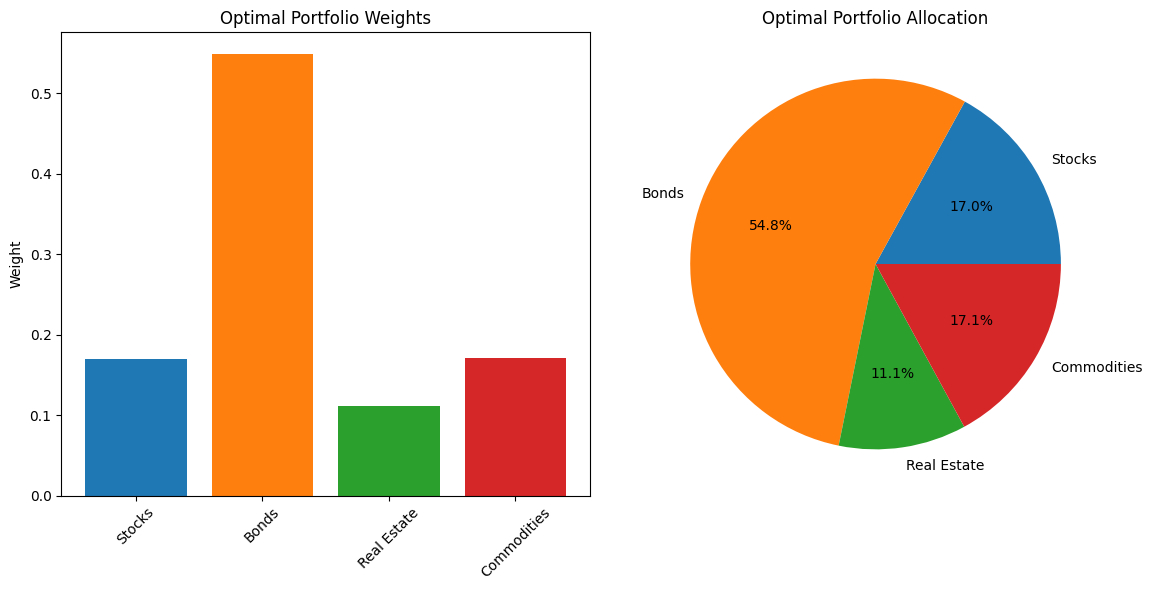
plt.figure(figsize=(12, 6))
colors = get_cmap('tab10').colors[:n_assets]
plt.subplot(1, 2, 1)
plt.bar(assets, optimal_weights, color=colors)
plt.title('Optimal Portfolio Weights')
plt.ylabel('Weight')
plt.xticks(rotation=45)
plt.subplot(1, 2, 2)
plt.pie(optimal_weights, labels=assets, autopct='%1.1f%%', colors=colors)
plt.title('Optimal Portfolio Allocation')
plt.tight_layout()
plt.show()
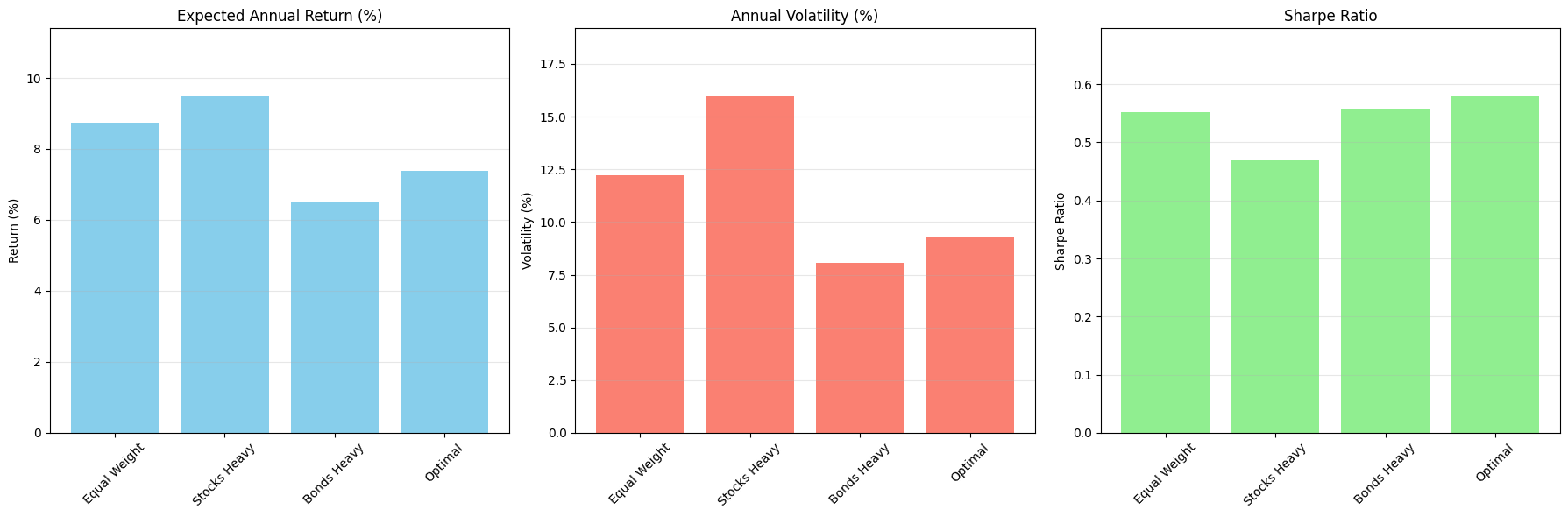
alternative_allocations = [
{'name': 'Equal Weight', 'weights': np.array([0.25, 0.25, 0.25, 0.25])},
{'name': 'Stocks Heavy', 'weights': np.array([0.70, 0.10, 0.10, 0.10])},
{'name': 'Bonds Heavy', 'weights': np.array([0.10, 0.70, 0.10, 0.10])},
{'name': 'Optimal', 'weights': optimal_weights}
]
performance_data = []
for alloc in alternative_allocations:
returns, volatility = portfolio_performance(alloc['weights'])
sharpe = (returns - risk_free_rate) / volatility
performance_data.append({
'Allocation': alloc['name'],
'Return': returns * 100,
'Volatility': volatility * 100,
'Sharpe Ratio': sharpe
})
performance_df = pd.DataFrame(performance_data)
fig, axes = plt.subplots(1, 3, figsize=(18, 6))
axes[0].bar(performance_df['Allocation'], performance_df['Return'], color='skyblue')
axes[0].set_title('Expected Annual Return (%)')
axes[0].set_ylabel('Return (%)')
axes[0].set_ylim(0, max(performance_df['Return']) * 1.2)
axes[0].grid(axis='y', alpha=0.3)
axes[0].set_xticklabels(performance_df['Allocation'], rotation=45)
axes[1].bar(performance_df['Allocation'], performance_df['Volatility'], color='salmon')
axes[1].set_title('Annual Volatility (%)')
axes[1].set_ylabel('Volatility (%)')
axes[1].set_ylim(0, max(performance_df['Volatility']) * 1.2)
axes[1].grid(axis='y', alpha=0.3)
axes[1].set_xticklabels(performance_df['Allocation'], rotation=45)
axes[2].bar(performance_df['Allocation'], performance_df['Sharpe Ratio'], color='lightgreen')
axes[2].set_title('Sharpe Ratio')
axes[2].set_ylabel('Sharpe Ratio')
axes[2].set_ylim(0, max(performance_df['Sharpe Ratio']) * 1.2)
axes[2].grid(axis='y', alpha=0.3)
axes[2].set_xticklabels(performance_df['Allocation'], rotation=45)
plt.tight_layout()
plt.show()
|