3D graph in Plotly

3D graph in Plotly

Here’s an example of how to create a 3D graph using Python’s $Plotly$ library.

In this example, we’ll create a 3D surface plot that visualizes a mathematical function.

Step 1: Install Plotly

If you don’t have $Plotly$ installed, you can install it using pip:

1
pip install plotly

Step 2: Create the 3D Graph

1
2
3
4
5
6
7
8
9
10
11
12
13
14
15
16
17
18
19
20
21
22
23
24
25
26
27
28
29
30
import numpy as np
import plotly.graph_objs as go
import plotly.io as pio

# Generate data
x = np.linspace(-5, 5, 100)
y = np.linspace(-5, 5, 100)
x, y = np.meshgrid(x, y)
z = np.sin(np.sqrt(x**2 + y**2))

# Create a 3D surface plot
surface = go.Surface(z=z, x=x, y=y, colorscale='Viridis')

# Define the layout of the plot
layout = go.Layout(
title='3D Surface Plot',
scene=dict(
xaxis=dict(title='X Axis'),
yaxis=dict(title='Y Axis'),
zaxis=dict(title='Z Axis'),
camera=dict(
eye=dict(x=1.5, y=1.5, z=1.5)
)
),
margin=dict(l=0, r=0, b=0, t=40)
)

# Create the figure and display it
fig = go.Figure(data=[surface], layout=layout)
pio.show(fig)

Explanation of the Code:

  • Data Generation:

    • x and y are generated using numpy‘s linspace function to create a grid of values.
    • z is the function we want to plot, in this case, $z = sin(sqrt(x^2 + y^2))$.
  • Surface Plot:

    • We use plotly.graph_objs.Surface to create the 3D surface plot.
      The colorscale='Viridis' argument applies a color gradient to the surface.
  • Layout:

    • The layout variable customizes the appearance of the plot, including axis titles and the camera angle.
    • The camera settings control the perspective of the 3D plot.
  • Display:

    • pio.show(fig) is used to render and display the graph in a new browser window or in your notebook interface.

Result:

Running this code will produce a beautiful, interactive 3D surface plot.

You can rotate, zoom, and pan the graph to explore it from different angles.

The Viridis colorscale provides a visually appealing gradient to highlight the surface’s features.

Output:

SciPy in Python

SciPy in Python

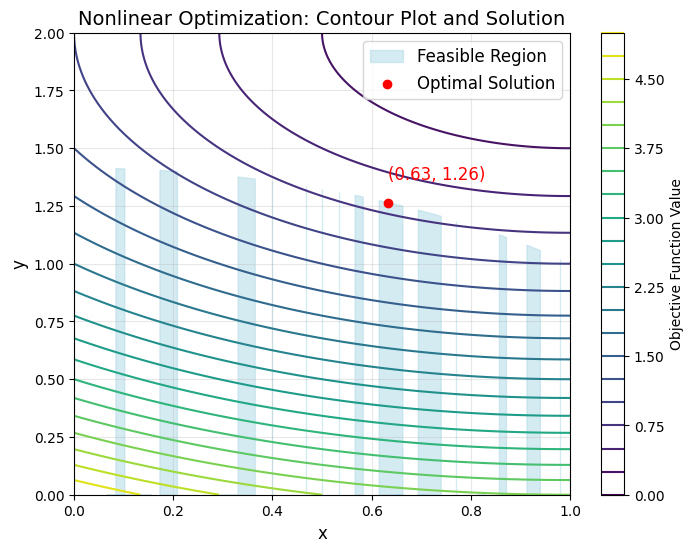
Here’s a complex example using $SciPy$ to solve a constrained nonlinear optimization problem.

We’ll solve the problem of finding the minimum of a nonlinear objective function subject to nonlinear constraints, which is a common problem in mathematical optimization.

Problem: Constrained Nonlinear Optimization

Objective Function

We want to minimize the following nonlinear function:

$$
f(x, y) = x^2 + y^2 + x \cdot y + \sin(x) + \cos(y)
$$

Constraints

Subject to the following nonlinear constraints:

  1. $(g_1(x, y) = x^2 + y - 1 \geq 0)$
  2. $(g_2(x, y) = x + y^2 - 1 \geq 0)$

Step 1: Import Required Libraries

1
2
3
4
5
6
import numpy as np
from scipy.optimize import minimize, NonlinearConstraint

# Define the objective function
def objective_function(x):
return x[0]**2 + x[1]**2 + x[0]*x[1] + np.sin(x[0]) + np.cos(x[1])

Step 2: Define the Constraints

1
2
3
4
5
6
7
8
9
10
11
# Define the first nonlinear constraint
def constraint1(x):
return x[0]**2 + x[1] - 1

# Define the second nonlinear constraint
def constraint2(x):
return x[0] + x[1]**2 - 1

# Nonlinear constraints should be of the form g(x) >= 0
nlc1 = NonlinearConstraint(constraint1, 0, np.inf)
nlc2 = NonlinearConstraint(constraint2, 0, np.inf)

Step 3: Define Initial Guess and Bounds

1
2
3
4
5
# Initial guess
x0 = np.array([0.5, 0.5])

# Bounds for variables x and y
bounds = [(-2, 2), (-2, 2)]

Step 4: Solve the Optimization Problem

1
2
3
4
5
6
7
8
9
# Use 'trust-constr' method for constrained optimization
result = minimize(objective_function, x0, method='trust-constr', bounds=bounds, constraints=[nlc1, nlc2])

# Print the result
print("Optimization Result:")
print("x:", result.x)
print("Objective Value:", result.fun)
print("Success:", result.success)
print("Message:", result.message)

Explanation of the Code

  1. Objective Function:

    • The objective function f(x, y) is defined as a $Python$ function that takes a vector x as input and returns the scalar value of the function.
  2. Constraints:

    • The constraints g_1(x, y) and g_2(x, y) are also defined as $Python$ functions.
    • NonlinearConstraint is used to represent each constraint, specifying the lower and upper bounds for the constraint (in this case, 0 to np.inf).
  3. Initial Guess and Bounds:

    • The initial guess x0 is an array of initial values for x and y.
    • The bounds specify the lower and upper limits for each variable.
  4. Optimization:

    • The minimize function is called with the trust-constr method, which is suitable for handling constrained nonlinear optimization problems.
    • The solution is stored in the result object, which contains information about the optimal values of x and y, the objective function value at the minimum, and the success status of the optimization.

Step 5: Analyze the Result

The output will provide the optimal values of $(x)$ and $(y)$ that minimize the objective function while satisfying the nonlinear constraints.

It also includes information on whether the optimization was successful.

Output

1
2
3
4
5
Optimization Result:
x: [-0.8463456 1.35880306]
Objective Value: 0.8741750487714591
Success: True
Message: `gtol` termination condition is satisfied.

Conclusion

This example demonstrates how to solve a complicated constrained nonlinear optimization problem using $SciPy$’s minimize function with the trust-constr method.

The problem involves an objective function with multiple variables and nonlinear constraints, making it a sophisticated and challenging optimization problem.

Portfolio Optimization (CVXPY)

CVXPY

Let’s dive into a complex optimization problem using $CVXPY$.

This example involves solving a portfolio optimization problem.

The goal is to allocate investments across multiple assets to maximize expected returns while minimizing risk, with constraints on the investment.

1
2
3
4
5
6
7
8
9
10
11
12
13
14
15
16
17
18
19
20
21
22
23
24
25
26
27
28
29
30
31
32
33
34
35
36
37
38
39
40
41
42
43
44
45
46
47
48
49
50
51
52
import cvxpy as cp
import numpy as np
import matplotlib.pyplot as plt

# Seed for reproducibility
np.random.seed(42)

# Number of assets
n = 10

# Generate random expected returns for each asset
mu = np.random.rand(n)

# Generate a random covariance matrix for asset returns
Sigma = np.random.rand(n, n)
Sigma = Sigma.T @ Sigma # To ensure it is positive semi-definite

# Define the variables (allocation of investments in each asset)
w = cp.Variable(n)

# Define the constraints
constraints = [
cp.sum(w) == 1, # The weights must sum to 1 (100% investment)
w >= 0, # No short-selling (non-negative weights)
]

# Define the objective function (maximize returns, minimize risk)
gamma = cp.Parameter(nonneg=True) # Risk aversion parameter
objective = cp.Maximize(mu.T @ w - gamma * cp.quad_form(w, Sigma))

# Define the problem
problem = cp.Problem(objective, constraints)

# Solve the problem for different values of gamma (risk aversion)
gammas = np.logspace(-3, 3, 100)
returns = []
risks = []

for g in gammas:
gamma.value = g
problem.solve()
returns.append(mu.T @ w.value)
risks.append(np.sqrt(w.value.T @ Sigma @ w.value))

# Plot the efficient frontier
plt.figure(figsize=(10, 6))
plt.plot(risks, returns, marker='o')
plt.xlabel("Risk (Standard Deviation)")
plt.ylabel("Expected Return")
plt.title("Efficient Frontier in Portfolio Optimization")
plt.grid(True)
plt.show()

Explanation of the Code:

  1. Problem Context:

    • The task is to allocate capital across n assets to maximize returns while managing risk. This is a typical problem in finance known as portfolio optimization.
  2. Expected Returns (mu):

    • mu represents the expected returns of each asset. In this example, these are randomly generated.
  3. Covariance Matrix (Sigma):

    • Sigma represents the covariance matrix of asset returns, showing how the returns on different assets move together. It’s crucial for understanding the risk of the portfolio.
  4. Investment Weights (w):

    • w is the decision variable, representing the fraction of total capital allocated to each asset.
  5. Objective Function:

    • The objective is to maximize the portfolio’s expected return (mu.T @ w) while penalizing risk (gamma * cp.quad_form(w, Sigma)). The risk aversion parameter gamma controls the trade-off between return and risk.
  6. Constraints:

    • The constraints ensure that the sum of all investments equals 1 (cp.sum(w) == 1), meaning all capital is invested, and no short-selling is allowed (w >= 0).
  7. Efficient Frontier:

    • The code solves the optimization problem for different levels of risk aversion (gamma). The results are used to plot the “efficient frontier,” a curve that shows the best possible expected return for each level of risk.
  8. Plotting:

    • The efficient frontier is plotted, showing the relationship between risk and return for the optimized portfolios.

Important Notes:

  • Efficient Frontier: The efficient frontier is a key concept in portfolio theory. It represents the set of portfolios that offer the highest expected return for a given level of risk.
  • Quadratic Programming: The problem involves quadratic programming due to the risk term (cp.quad_form(w, Sigma)), which is a quadratic function of the weights.
  • Risk Aversion: By varying gamma, the level of risk aversion, you can explore how different trade-offs between risk and return affect the optimal portfolio.

This example demonstrates a more advanced use of $CVXPY$ in a practical financial context, incorporating quadratic programming and exploring the trade-offs in a multi-objective optimization problem.

Output:

The graph you’ve provided is an Efficient Frontier plot in the context of portfolio optimization.

Here’s a breakdown of what this graph represents:

1. Axes:

  • X-axis (Risk - Standard Deviation): This axis represents the risk associated with the portfolio, measured by the standard deviation of the portfolio’s returns. Higher standard deviation indicates higher risk.
  • Y-axis (Expected Return): This axis shows the expected return of the portfolio. Higher values indicate greater expected returns.

2. Efficient Frontier:

  • The curve itself represents the Efficient Frontier. This is a fundamental concept in portfolio theory. Each point on the curve corresponds to a portfolio that offers the highest expected return for a given level of risk.
  • Moving along the curve from left to right, the risk increases (standard deviation increases), and the expected return also increases. However, the rate of increase in return diminishes as risk increases, which reflects the diminishing returns of taking on additional risk.

3. Interpretation:

  • Leftmost part of the curve: This section represents portfolios with the lowest risk. These portfolios also tend to have lower returns, but they are considered the “safest” in terms of volatility.
  • Rightmost part of the curve: This section shows portfolios with higher risk and higher expected returns. However, these portfolios are more volatile and less predictable.
  • Middle of the curve: This section typically represents the best trade-offs between risk and return. These portfolios are often preferred by investors seeking an optimal balance between risk and return.

4. Why the Curve?:

  • The shape of the curve is due to the fact that increasing risk does not linearly increase expected returns. Initially, small increases in risk can lead to significant increases in return, but after a certain point, additional risk leads to only marginal increases in return.

5. Use in Investment Decisions:

  • Investors use the efficient frontier to choose a portfolio that matches their risk tolerance. For example:
    • A risk-averse investor might choose a portfolio on the lower left of the curve, accepting lower returns for lower risk.
    • A risk-seeking investor might choose a portfolio on the upper right, accepting higher risk for higher potential returns.

6. The Underlying Optimization:

  • The curve is derived from solving multiple optimization problems where the objective is to maximize expected return for a given level of risk or minimize risk for a given level of expected return. These problems are typically solved using mathematical optimization techniques like quadratic programming.

In summary, this graph visualizes the trade-offs between risk and return for a set of optimal portfolios.

Investors can use it to select a portfolio that best aligns with their financial goals and risk tolerance.

Seaborn in Python(3)

Seaborn in Python(3)

Here’s a more complicated visualization example using $Seaborn$, which includes a combination of different plot types, customized aesthetics, and advanced features like hue, size, and style mappings.

This graph will visualize the relationship between multiple variables in a dataset, offering insights into complex interactions.

Complex Seaborn Visualization: Multi-Variable Plot with Customizations

1
2
3
4
5
6
7
8
9
10
11
12
13
14
15
16
17
18
19
20
21
22
23
24
25
26
27
28
29
30
31
32
33
34
35
36
37
38
39
40
41
42
43
44
45
46
47
48
49
50
51
52
53
import seaborn as sns
import matplotlib.pyplot as plt
import pandas as pd

# Load the 'penguins' dataset from Seaborn
penguins = sns.load_dataset("penguins")

# Set the aesthetic style of the plots
sns.set_style("whitegrid")

# Create a scatter plot with different markers for species and a regression line
plt.figure(figsize=(12, 8))
sns.scatterplot(
data=penguins,
x="bill_length_mm",
y="bill_depth_mm",
hue="species",
style="island",
size="flipper_length_mm",
sizes=(20, 200),
palette="deep",
markers=["o", "s", "D"],
edgecolor="black"
)

# Add a regression line for each species
sns.regplot(
data=penguins,
x="bill_length_mm",
y="bill_depth_mm",
scatter=False,
color="gray",
line_kws={'lw': 1, 'linestyle': '--'}
)

# Customize the legend
plt.legend(
title='Species, Island, & Flipper Length',
title_fontsize='13',
fontsize='10',
loc='upper left',
bbox_to_anchor=(1, 1),
borderaxespad=0
)

# Add a title and labels
plt.title("Penguins: Bill Length vs. Bill Depth with Flipper Length and Island Information", fontsize=16)
plt.xlabel("Bill Length (mm)", fontsize=14)
plt.ylabel("Bill Depth (mm)", fontsize=14)

# Show the plot
plt.tight_layout()
plt.show()

Explanation of the Plot

  • Scatter Plot:
    The scatter plot displays the relationship between bill length and bill depth for penguins, with points representing individual penguins.
  • Hue:
    Different species of penguins are distinguished by different colors.
  • Style:
    Penguins from different islands are shown with different marker styles (circle, square, diamond).
  • Size:
    The size of the markers corresponds to the flipper length, with larger markers representing longer flippers.
  • Regression Line:
    A dashed regression line is overlaid to show the trend between bill length and depth for the entire dataset.
  • Legend:
    The legend provides information on species, island, and flipper length, helping to interpret the plot.

This visualization combines multiple layers of information into a single, interpretable plot, making it ideal for exploring complex datasets where multiple variables interact.

Output

Seaborn in Python(2)

Seaborn in Python

Here’s a more complex example using $Seaborn$ that involves multiple types of plots combined into a single figure.

This example demonstrates a $FacetGrid$ with customizations, including different plots for subsets of data and a combined heatmap with a categorical scatter plot.

1. FacetGrid with Multiple Plots

1
2
3
4
5
6
7
8
9
10
11
12
13
14
15
16
17
import seaborn as sns
import matplotlib.pyplot as plt
from matplotlib import gridspec

# Load the Titanic dataset
titanic = sns.load_dataset("titanic")

# Create a FacetGrid showing survival rate across different classes and genders
g = sns.FacetGrid(titanic, row="sex", col="class", margin_titles=True, height=4)
g.map(sns.histplot, "age", bins=20, kde=True)

# Add a title
plt.subplots_adjust(top=0.9)
g.fig.suptitle('Survival Rate by Age, Sex, and Class')

# Show the plot
plt.show()

Output:

2. Combined Heatmap and Categorical Scatter Plot

1
2
3
4
5
6
7
8
9
10
11
12
13
14
15
16
17
18
19
20
21
22
23
24
25
26
27
28
29
30
import seaborn as sns
import matplotlib.pyplot as plt
import pandas as pd

# Load the flights dataset
flights = sns.load_dataset("flights")

# Pivot the dataset for a heatmap
flights_pivot = flights.pivot(index="month", columns="year", values="passengers")

# Set up the figure with a specific layout
fig = plt.figure(figsize=(14, 8))
gs = gridspec.GridSpec(2, 2, width_ratios=[3, 1], height_ratios=[1, 3])

# Heatmap on the left
ax0 = plt.subplot(gs[:, 0])
sns.heatmap(flights_pivot, annot=True, fmt="d", cmap="YlGnBu", ax=ax0)

# Categorical scatter plot (strip plot) on the right
ax1 = plt.subplot(gs[1, 1])
sns.stripplot(x="year", y="passengers", data=flights, jitter=True, ax=ax1)

# Add a title and labels
ax0.set_title('Flights Heatmap (Year vs Month)')
ax1.set_title('Yearly Passenger Distribution')
ax1.set_ylabel('')

# Show the plot
plt.tight_layout()
plt.show()

Output:

3. Violin Plot with a Swarm Plot Overlay

1
2
3
4
5
6
7
8
9
10
11
12
13
14
15
16
17
import seaborn as sns
import matplotlib.pyplot as plt

# Load the iris dataset
iris = sns.load_dataset("iris")

# Create a violin plot
sns.violinplot(x="species", y="petal_length", data=iris, inner=None, palette="Set2")

# Overlay with a swarm plot
sns.swarmplot(x="species", y="petal_length", data=iris, color="k", alpha=0.7)

# Add a title
plt.title("Violin and Swarm Plot of Iris Petal Length by Species")

# Show the plot
plt.show()

Output:

4. PairGrid with Custom Plots

1
2
3
4
5
6
7
8
9
10
11
12
13
14
15
16
17
import seaborn as sns
import matplotlib.pyplot as plt

# Load the tips dataset
tips = sns.load_dataset("tips")

# Create a PairGrid with different plots on the diagonal, upper, and lower triangles
g = sns.PairGrid(tips, diag_sharey=False)
g.map_upper(sns.scatterplot)
g.map_lower(sns.kdeplot, cmap="Blues_d")
g.map_diag(sns.histplot, kde_kws={"color": "k"})

# Add a title
g.fig.suptitle('PairGrid with Custom Plots', y=1.02)

# Show the plot
plt.show()

Output:


These examples demonstrate more advanced uses of $Seaborn$, including combining different plot types, customizing layouts, and visualizing complex datasets.

Seaborn in Python

Seaborn in Python

Here’s a sample code using $Seaborn$, a $Python$ visualization library based on $Matplotlib$, that creates a variety of plots.

This example demonstrates how to create a simple scatter plot with regression lines, a pair plot, and a heatmap.

1. Scatter Plot with Regression Line

1
2
3
4
5
6
7
8
9
10
11
import seaborn as sns
import matplotlib.pyplot as plt

# Load the example dataset for tips
tips = sns.load_dataset("tips")

# Create a scatter plot with a regression line
sns.lmplot(x="total_bill", y="tip", data=tips)

# Show the plot
plt.show()

Output:

2. Pair Plot

1
2
3
4
5
6
7
8
9
10
11
import seaborn as sns
import matplotlib.pyplot as plt

# Load the iris dataset
iris = sns.load_dataset("iris")

# Create a pair plot
sns.pairplot(iris, hue="species")

# Show the plot
plt.show()

Output:

3. Heatmap

1
2
3
4
5
6
7
8
9
10
11
12
import seaborn as sns
import matplotlib.pyplot as plt
import numpy as np

# Create a random matrix
data = np.random.rand(10, 12)

# Create a heatmap
sns.heatmap(data, annot=True, cmap="coolwarm")

# Show the plot
plt.show()

Output:

4. Box Plot

1
2
3
4
5
6
7
8
9
10
11
import seaborn as sns
import matplotlib.pyplot as plt

# Load the Titanic dataset
titanic = sns.load_dataset("titanic")

# Create a box plot
sns.boxplot(x="class", y="age", data=titanic, palette="Set3")

# Show the plot
plt.show()

Output:


These examples showcase the basics of using $Seaborn$ for data visualization.

The library provides a variety of other plot types and customization options to explore!

XGBoost in Python

XGBoost in Python

Here’s a basic example of how to use $XGBoost$ in $Python$ for a classification task.

This example uses the popular $Iris$ $dataset$.

Install XGBoost

If you don’t have $XGBoost$ installed, you can install it using pip:

1
pip install xgboost

Sample Code

1
2
3
4
5
6
7
8
9
10
11
12
13
14
15
16
17
18
19
20
21
22
23
24
25
26
27
28
29
30
31
32
33
34
35
36
import xgboost as xgb
from sklearn.datasets import load_iris
from sklearn.model_selection import train_test_split
from sklearn.metrics import accuracy_score

# Load the Iris dataset
iris = load_iris()
X = iris.data
y = iris.target

# Split the data into training and testing sets
X_train, X_test, y_train, y_test = train_test_split(X, y, test_size=0.2, random_state=42)

# Convert the dataset into DMatrix, which is XGBoost's internal data structure
dtrain = xgb.DMatrix(X_train, label=y_train)
dtest = xgb.DMatrix(X_test, label=y_test)

# Set parameters for XGBoost
params = {
'objective': 'multi:softmax', # Specify the loss function
'num_class': 3, # Number of classes in the dataset
'max_depth': 3, # Maximum depth of a tree
'eta': 0.3, # Step size shrinkage
'eval_metric': 'mlogloss' # Evaluation metric
}

# Train the model
num_rounds = 50 # Number of boosting rounds
bst = xgb.train(params, dtrain, num_rounds)

# Make predictions on the test set
y_pred = bst.predict(dtest)

# Calculate accuracy
accuracy = accuracy_score(y_test, y_pred)
print(f'Accuracy: {accuracy * 100:.2f}%')

Explanation

  1. Loading the Dataset: We use the $Iris$ $dataset$, which is a common dataset for classification tasks.
    It contains three classes of flowers.

  2. Splitting the Data: The dataset is split into training and testing sets using train_test_split.

  3. DMatrix: $XGBoost$ uses its own data structure called DMatrix for training.
    It is more efficient and optimized for $XGBoost$ operations.

  4. Setting Parameters:

    • objective: Defines the learning task and the corresponding objective function.
      In this case, multi:softmax is used for multiclass classification.
    • num_class: Specifies the number of classes.
    • max_depth: The maximum depth of the trees.
    • eta: The learning rate.
  5. Training: The model is trained using the train function with the specified parameters and number of boosting rounds.

  6. Prediction: The trained model makes predictions on the test set, and the accuracy is calculated using accuracy_score.

This is a basic example, but $XGBoost$ offers a wide range of parameters and options that can be fine-tuned for different types of data and tasks.

Output

1
Accuracy: 100.00%

statsmodels in Python

statsmodels in Python

$statsmodels$ is a powerful $Python$ library used for statistical modeling and analysis.

It provides classes and functions for many statistical models, such as linear regression, generalized linear models, time series analysis, and more.

Here are some sample codes using $statsmodels$:

1. Ordinary Least Squares (OLS) Regression

1
2
3
4
5
6
7
8
9
10
11
12
13
14
15
16
17
18
import statsmodels.api as sm
import numpy as np
import pandas as pd

# Generate some example data
np.random.seed(0)
X = np.random.rand(100)
y = 2 * X + 1 + np.random.randn(100) * 0.1

# Add a constant term (intercept) to the independent variable
X = sm.add_constant(X)

# Fit an OLS model
model = sm.OLS(y, X)
results = model.fit()

# Print out the summary of the regression
print(results.summary())

Explanation:

  • X is the independent variable, and y is the dependent variable.
  • sm.add_constant(X) adds a constant (intercept) to the model.
  • model = sm.OLS(y, X) creates an OLS model.
  • results = model.fit() fits the model to the data.
  • results.summary() provides a detailed summary of the regression results.

Output:

1
2
3
4
5
6
7
8
9
10
11
12
13
14
15
16
17
18
19
20
21
22
23
24
25
                            OLS Regression Results                            
==============================================================================
Dep. Variable: y R-squared: 0.971
Model: OLS Adj. R-squared: 0.971
Method: Least Squares F-statistic: 3262.
Date: Mon, 12 Aug 2024 Prob (F-statistic): 4.88e-77
Time: 02:46:51 Log-Likelihood: 88.744
No. Observations: 100 AIC: -173.5
Df Residuals: 98 BIC: -168.3
Df Model: 1
Covariance Type: nonrobust
==============================================================================
coef std err t P>|t| [0.025 0.975]
------------------------------------------------------------------------------
const 1.0222 0.019 52.884 0.000 0.984 1.061
x1 1.9937 0.035 57.117 0.000 1.924 2.063
==============================================================================
Omnibus: 11.746 Durbin-Watson: 2.083
Prob(Omnibus): 0.003 Jarque-Bera (JB): 4.097
Skew: 0.138 Prob(JB): 0.129
Kurtosis: 2.047 Cond. No. 4.30
==============================================================================

Notes:
[1] Standard Errors assume that the covariance matrix of the errors is correctly specified.

2. Logistic Regression

1
2
3
4
5
6
7
8
9
10
11
12
13
14
15
16
17
18
import statsmodels.api as sm
import numpy as np

# Generate some example data
np.random.seed(0)
n_samples = 100
X = np.random.rand(n_samples, 1)
X = sm.add_constant(X) # Add intercept

# Binary outcome (0 or 1)
y = (X[:, 1] + np.random.randn(n_samples) * 0.1 > 0.5).astype(int)

# Fit a logistic regression model
model = sm.Logit(y, X)
results = model.fit()

# Print out the summary of the logistic regression
print(results.summary())

Explanation:

  • y is a binary outcome ($0$ or $1$).
  • sm.Logit(y, X) creates a logistic regression model.
  • results = model.fit() fits the logistic regression model to the data.
  • results.summary() provides a summary of the logistic regression results.

Output:

1
2
3
4
5
6
7
8
9
10
11
12
13
14
15
16
17
18
Optimization terminated successfully.
Current function value: 0.195832
Iterations 9
Logit Regression Results
==============================================================================
Dep. Variable: y No. Observations: 100
Model: Logit Df Residuals: 98
Method: MLE Df Model: 1
Date: Mon, 12 Aug 2024 Pseudo R-squ.: 0.7175
Time: 02:47:53 Log-Likelihood: -19.583
converged: True LL-Null: -69.315
Covariance Type: nonrobust LLR p-value: 1.999e-23
==============================================================================
coef std err z P>|z| [0.025 0.975]
------------------------------------------------------------------------------
const -8.1375 1.924 -4.229 0.000 -11.909 -4.366
x1 16.9601 3.829 4.430 0.000 9.456 24.464
==============================================================================

3. Time Series Analysis using ARIMA

1
2
3
4
5
6
7
8
9
10
11
12
13
14
15
16
17
18
19
20
21
22
23
24
25
import statsmodels.api as sm
import numpy as np

# Generate some example time series data
np.random.seed(0)
n_samples = 100
time_series_data = np.cumsum(np.random.randn(n_samples))

# Fit an ARIMA model (ARIMA(p, d, q))
model = sm.tsa.ARIMA(time_series_data, order=(1, 1, 1))
results = model.fit()

# Print out the summary of the ARIMA model
print(results.summary())

# Plot the forecast
forecast = results.get_forecast(steps=10)
forecast_index = np.arange(len(time_series_data), len(time_series_data) + 10)
forecast_mean = forecast.predicted_mean

import matplotlib.pyplot as plt
plt.plot(time_series_data, label='Original Time Series')
plt.plot(forecast_index, forecast_mean, label='Forecast')
plt.legend()
plt.show()

Explanation:

  • time_series_data is the time series data to model.
  • sm.tsa.ARIMA(time_series_data, order=(1, 1, 1)) creates an ARIMA model with specific orders for AR, differencing, and MA.
  • results.get_forecast(steps=10) forecasts the next $10$ steps in the time series.

Output:

4. ANOVA (Analysis of Variance)

1
2
3
4
5
6
7
8
9
10
11
12
13
14
15
16
17
import statsmodels.api as sm
import pandas as pd
from statsmodels.formula.api import ols

# Create example data
np.random.seed(0)
df = pd.DataFrame({
'Group': np.repeat(['A', 'B', 'C'], 20),
'Value': np.concatenate([np.random.randn(20) + 1, np.random.randn(20), np.random.randn(20) - 1])
})

# Fit an OLS model with categorical variable
model = ols('Value ~ Group', data=df).fit()

# Perform ANOVA
anova_table = sm.stats.anova_lm(model, typ=2)
print(anova_table)

Explanation:

  • df contains a categorical variable Group and a continuous variable Value.
  • ols('Value ~ Group', data=df) fits an OLS model treating Group as a categorical variable.
  • sm.stats.anova_lm(model, typ=2) performs ANOVA on the fitted model.

Output:

1
2
3
             sum_sq    df          F        PR(>F)
Group 87.890846 2.0 43.127056 3.920858e-12
Residual 58.081616 57.0 NaN NaN

5. Autoregressive Model (AR)

1
2
3
4
5
6
7
8
9
10
11
12
13
14
15
16
17
18
19
20
21
22
23
24
25
import statsmodels.api as sm
from statsmodels.tsa.ar_model import AutoReg
import numpy as np
import matplotlib.pyplot as plt

# Generate some example time series data
np.random.seed(0)
n_samples = 100
time_series_data = np.cumsum(np.random.randn(n_samples))

# Fit an Autoregressive (AR) model using AutoReg
model = AutoReg(time_series_data, lags=1)
results = model.fit()

# Print out the summary of the AR model
print(results.summary())

# Plot the predictions
predictions = results.predict(start=90, end=109)

plt.plot(time_series_data, label='Original Time Series')
plt.plot(range(90, 110), predictions, label='Predicted')
plt.legend()
plt.show()

Explanation:

  • AutoReg(time_series_data, lags=1) creates an autoregressive model with a specified number of lags.
  • The lags parameter specifies how many previous time points to use for predicting the next value.
  • results.predict(start=90, end=109) generates predictions for the specified range.

Output:


These examples demonstrate the versatility of $statsmodels$ in performing various statistical analyses and generating useful insights from data.

Bokeh in Python

Bokeh in Python

Here’s an example of how to create some useful graphs using $Bokeh$ in $Python$:

  1. Line Plot:
    A simple line plot showing trends over time.
  2. Bar Plot:
    A bar plot to compare categories.
  3. Scatter Plot:
    A scatter plot to see the relationship between two variables.
  4. Histogram:
    A histogram to visualize the distribution of data.

First, you need to install $Bokeh$ if you haven’t already:

1
pip install bokeh

Here’s the code to create these plots:

1
2
3
4
5
6
7
8
9
10
11
12
13
14
15
16
17
18
19
20
21
22
23
24
25
26
27
28
29
30
31
32
33
34
35
36
37
38
39
40
41
42
43
from bokeh.plotting import figure, show, output_notebook
from bokeh.layouts import gridplot
from bokeh.models import ColumnDataSource
import numpy as np

# Prepare data
x = np.linspace(0, 4 * np.pi, 100)
y = np.sin(x)

categories = ['A', 'B', 'C', 'D']
values = [10, 20, 30, 40]

np.random.seed(1)
x_scatter = np.random.rand(100)
y_scatter = np.random.rand(100)

data = np.random.randn(1000)

# Output to notebook
output_notebook()

# Line plot
p1 = figure(title="Line Plot", x_axis_label='x', y_axis_label='y')
p1.line(x, y, legend_label="sin(x)", line_width=2)

# Bar plot
p2 = figure(x_range=categories, title="Bar Plot", x_axis_label='Category', y_axis_label='Values')
p2.vbar(x=categories, top=values, width=0.5)

# Scatter plot
p3 = figure(title="Scatter Plot", x_axis_label='X', y_axis_label='Y')
p3.scatter(x_scatter, y_scatter, size=8, color="navy", alpha=0.5)

# Histogram
hist, edges = np.histogram(data, bins=30)
p4 = figure(title="Histogram", x_axis_label='Value', y_axis_label='Frequency')
p4.quad(top=hist, bottom=0, left=edges[:-1], right=edges[1:], fill_color="navy", line_color="white", alpha=0.7)

# Arrange plots in a grid
grid = gridplot([[p1, p2], [p3, p4]])

# Show the plots
show(grid)

Explanation

  1. Line Plot:

    • figure() creates a new plot with a title and axis labels.
    • p1.line(x, y, ...) adds a line to the plot using the data in x and y.
  2. Bar Plot:

    • The x-axis is categorical, so x_range=categories.
    • p2.vbar(...) draws vertical bars.
  3. Scatter Plot:

    • A scatter plot shows the relationship between two variables using dots.
    • p3.scatter(...) plots the points.
  4. Histogram:

    • np.histogram computes the histogram of the data.
    • p4.quad(...) creates the bars of the histogram.

Running the Code

This code should be run in a $Jupyter notebook$ or a similar environment that supports $Bokeh$’s interactive plots.

It will output the plots inline.

Output


Google OR-Tools

Google OR-Tools

Here is a basic example of using $OR-Tools$ in $Python$ to solve a simple linear programming problem.

$OR-Tools$ is a powerful optimization library provided by Google, and it can be used to solve a wide range of problems, including linear programming, mixed-integer programming, constraint programming, and more.

Example: Linear Programming with OR-Tools

This example demonstrates solving a linear programming problem where we want to maximize the objective function $3x + 4y$ subject to some constraints.

1
2
3
4
5
6
7
8
9
10
11
12
13
14
15
16
17
18
19
20
21
22
23
24
25
26
27
28
29
30
31
32
33
34
from ortools.linear_solver import pywraplp

def main():
# Create the solver with the SCIP backend.
solver = pywraplp.Solver.CreateSolver('SCIP')
if not solver:
return

# Create the variables x and y.
x = solver.NumVar(0, solver.infinity(), 'x')
y = solver.NumVar(0, solver.infinity(), 'y')

# Create the constraints.
solver.Add(2 * x + 3 * y <= 12)
solver.Add(4 * x + y <= 14)
solver.Add(3 * x - y >= 0)

# Define the objective function.
objective = solver.Maximize(3 * x + 4 * y)

# Solve the problem.
status = solver.Solve()

# Check the result status.
if status == pywraplp.Solver.OPTIMAL:
print('Solution:')
print('Objective value =', solver.Objective().Value())
print('x =', x.solution_value())
print('y =', y.solution_value())
else:
print('The problem does not have an optimal solution.')

if __name__ == '__main__':
main()

Explanation

  • Solver: We create a solver instance using pywraplp.Solver.CreateSolver('SCIP'). $SCIP$ is a powerful mixed-integer programming solver, and $OR-Tools$ uses it as one of its backends.
  • Variables: We define two variables, x and y, both with a lower bound of 0 and an upper bound of infinity.
  • Constraints: We add three constraints:
    1. $(2x + 3y \leq 12)$
    2. $(4x + y \leq 14)$
    3. $(3x - y \geq 0)$
  • Objective: We want to maximize the function $3x + 4y$.
  • Solve: The solver solves the problem, and we check if an optimal solution was found.
  • Result: If a solution is found, it prints the optimal objective value and the values of x and y.

Output

1
2
3
4
Solution:
Objective value = 17.0
x = 2.9999999999999996
y = 2.0000000000000018

Let’s break down the result of the optimization problem using $OR-Tools$:

Objective Value:

  • Objective value = 17.0: This is the maximum value of the objective function 3x + 4y given the constraints.
    The solver found that this is the highest value that can be achieved without violating any of the constraints.

Variable Values:

  • x = 2.9999999999999996: This is the optimal value of the variable x that maximizes the objective function.
    Due to floating-point precision in computational mathematics, this value is extremely close to 3 (but not exactly 3).
  • y = 2.0000000000000018: Similarly, this is the optimal value of the variable y. This value is extremely close to 2.

Interpretation:

  • Floating-Point Precision: The values 2.9999999999999996 for x and 2.0000000000000018 for y are due to the way computers handle floating-point arithmetic. In practice, these values can be considered as x = 3 and y = 2.

  • Objective Function Calculation: Given the optimal values of x and y, we can calculate the objective function:
    $$
    3x + 4y = 3(3) + 4(2) = 9 + 8 = 17
    $$
    This confirms that the objective value of 17.0 is indeed the maximum value that can be achieved under the given constraints.

Summary:

The solver has determined that to achieve the maximum value of 17 for the objective function 3x + 4y, the values of x and y should be approximately 3 and 2, respectively.

The slight deviations from exact integers are due to the limitations of floating-point representation in computers.

Running the Code

To run this code, ensure you have installed the $OR-Tools$ package.
You can install it using pip:

1
pip install ortools

This example should give you a good starting point for working with $OR-Tools$ in $Python$.