Correlation Between Study Hours and Test Scores
I’ll create a data science example using $Python$ that demonstrates data analysis and visualization.
Let’s analyze a dataset of student performance based on study hours and create visualizations to understand the relationship.
1 | import numpy as np |
Let me explain this data science example step by step:
Data Generation and Setup:
- We create synthetic data for $50$ students
- Each student has study hours (normally distributed around $7$ hours)
- Test scores are generated based on study hours with some random noise
- We ensure scores stay within $0$-$100$ range
Analysis Performed:
- Basic statistics (mean study hours and test scores)
- Correlation between study hours and test scores
- Linear regression to predict test scores from study hours
- Model performance metrics ($R$-$squared$ and $RMSE$)
Visualizations:
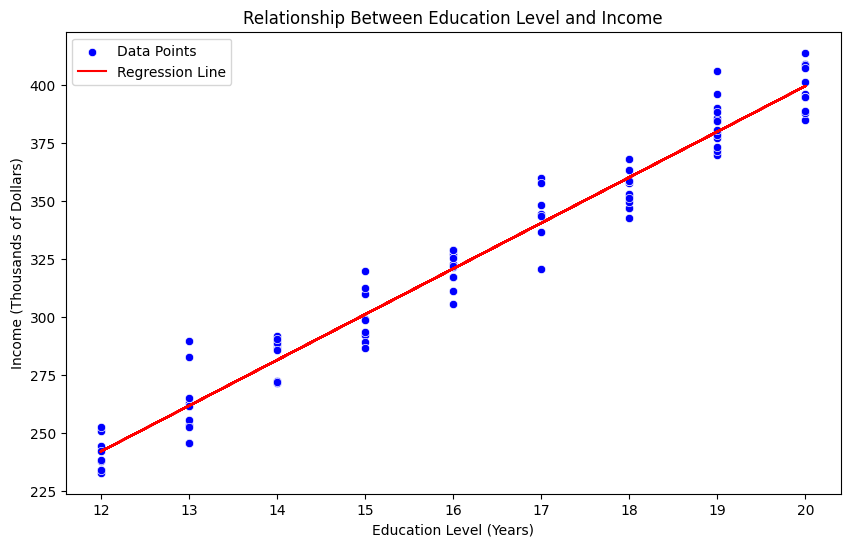
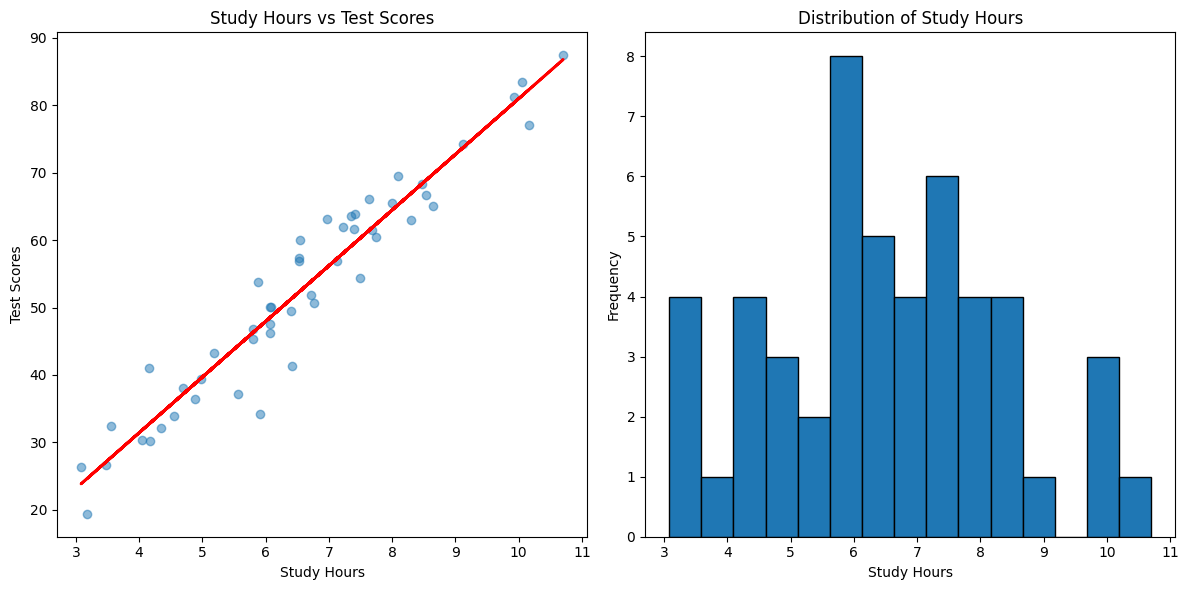
- Left plot: Scatter plot showing relationship between study hours and test scores
- Blue dots represent individual students
- Red line shows the linear regression prediction
- Right plot: Histogram showing distribution of study hours
- Shows how many students study for different amounts of time
- Left plot: Scatter plot showing relationship between study hours and test scores
Key Findings (will vary with random data):
- There’s a positive correlation between study hours and test scores
- The linear regression line shows the general trend
- The $R$-$squared$ value indicates how well study hours predict test scores
- The coefficient shows how many points scores increase per additional study hour
This example demonstrates several key data science concepts:
- Data cleaning and preparation
- Statistical analysis
- Linear regression modeling
- Data visualization
- Model evaluation
Output
Analysis Results:
Average study hours: 6.55
Average test score: 52.48
Correlation coefficient: 0.96
R-squared value: 0.93
Root Mean Square Error: 4.30
For each additional hour of study, score increases by: 8.26 points