Problem
Suppose we want to simulate a normal distribution $( \mathcal{N}(\mu, \sigma^2) )$ with a mean $( \mu = 50 )$ and a standard deviation $( \sigma = 10 )$.
Using this distribution, we will:
- Generate a random sample of size $1000$.
- Compute the sample mean and standard deviation to verify they align with the theoretical values.
- Visualize the distribution as a histogram overlaid with the theoretical probability density function ($PDF$).
Python Code
1 | import numpy as np |
Explanation
Random Sample:
- We generate a sample of size $1000$ from the normal distribution $ \mathcal{N}(\mu=50, \sigma=10) $ using
np.random.normal.
- We generate a sample of size $1000$ from the normal distribution $ \mathcal{N}(\mu=50, \sigma=10) $ using
Sample Statistics:
- The mean $( \bar{x} )$ and standard deviation $( s )$ of the sample are computed using
np.meanandnp.std.
These values should closely match the theoretical values $( \mu = 50 )$ and $( \sigma = 10 )$ due to the large sample size.
- The mean $( \bar{x} )$ and standard deviation $( s )$ of the sample are computed using
Visualization:
- The histogram of the sample shows the empirical distribution of the generated data.
- The theoretical PDF $( \frac{1}{\sqrt{2\pi\sigma^2}}e^{-\frac{(x-\mu)^2}{2\sigma^2}} )$ is overlaid to illustrate how closely the sample follows the theoretical distribution.
Output
Sample Statistics:
1
2
Sample Mean: 50.19
Sample Standard Deviation: 9.79These values are very close to the theoretical $( \mu = 50 )$ and $( \sigma = 10 )$, verifying the correctness of the simulation.
Graph:
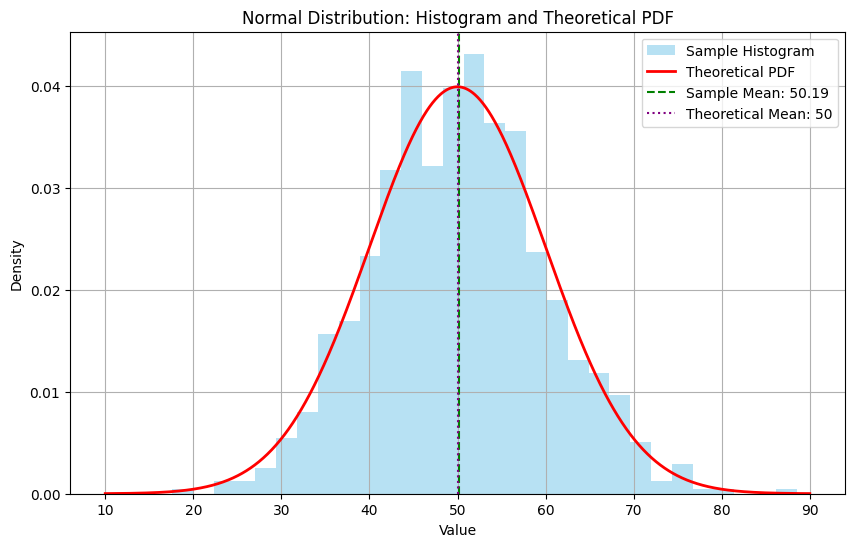
- The histogram of the sample aligns closely with the red line (theoretical $PDF$).
- Vertical lines indicate the sample mean (green) and the theoretical mean (purple), showing their proximity.
This example demonstrates how to simulate, analyze, and visualize data from a probability distribution effectively using $Python$.