A Linear Programming Deep Dive
Security Operations Centers never sleep. They run 24/7, and getting the staffing just right — enough analysts to cover every shift without ballooning costs — is a classic operations research problem. In this post, we’ll model a realistic SOC staffing scenario and solve it using Linear Programming (LP) with Python’s PuLP library, then visualize the results in both 2D and 3D.
🔐 The Problem
Imagine you’re the SOC manager at a mid-sized financial firm. You have shift analysts who each work 5 consecutive days followed by 2 days off (a standard rotating schedule). Your job is to find the minimum number of analysts to hire per shift rotation so that every day of the week meets the minimum staffing requirement.
Daily Minimum Requirements
| Day | Min Analysts Required |
|---|---|
| Monday | 17 |
| Tuesday | 13 |
| Wednesday | 15 |
| Thursday | 19 |
| Friday | 14 |
| Saturday | 16 |
| Sunday | 11 |
Each analyst rotation starts on a different day of the week. An analyst starting on day $i$ works days $i, i+1, i+2, i+3, i+4$ (mod 7).
🧮 Mathematical Formulation
Let $x_i$ = number of analysts whose shift starts on day $i$ (where $i = 0$ is Monday).
Objective: Minimize total staff hired:
$$\min \sum_{i=0}^{6} x_i$$
Subject to: For each day $d$, the sum of analysts working on that day must meet the minimum:
$$\sum_{i \in S_d} x_i \geq r_d \quad \forall d \in {0,1,…,6}$$
where $S_d = { i \mid d \in {i, i+1, i+2, i+3, i+4} \pmod{7} }$ is the set of shift-starts that cover day $d$, and $r_d$ is the minimum requirement for day $d$.
Non-negativity and integrality:
$$x_i \in \mathbb{Z}_{\geq 0} \quad \forall i$$
🐍 Python Source Code
1 | # ============================================================ |
🔍 Code Walkthrough
Section 1 — Problem Definition
We define the 7-day week and the min_required dictionary that captures how many analysts must be on duty each day. These numbers simulate a real-world SOC where threat activity peaks mid-week and during weekends.
Section 2 — Coverage Matrix
This is the heart of the formulation. We build a $7 \times 7$ binary matrix where:
$$\text{coverage}[i][d] = \begin{cases} 1 & \text{if shift starting on day } i \text{ covers day } d \ 0 & \text{otherwise} \end{cases}$$
An analyst starting Monday (day 0) works Mon–Fri, so columns 0–4 are 1 for row 0.
Section 3 — ILP Model with PuLP
We use pulp.LpProblem with LpMinimize. Each decision variable x[i] is declared as a non-negative integer (cat='Integer'). The objective sums all $x_i$, and the constraints enforce the coverage condition for every day.
Section 4 — Solving
PuLP’s built-in CBC solver handles the ILP in milliseconds for this scale. The solution extracts the optimal $x_i$ values and computes actual coverage via the matrix product $\text{coverage}^T \cdot \mathbf{x}$.
Section 5 — Sensitivity Analysis
We loop over 31 demand scaling factors from $0.5\times$ to $2.0\times$ the baseline requirements, re-solving the ILP at each scale. This reveals how total staffing cost grows as threat load increases — a critical insight for budget planning.
Section 6 — Visualization (9 panels)
| Panel | What it shows |
|---|---|
| 1 | Bar chart of analysts hired per shift start |
| 2 | Side-by-side required vs. actual coverage |
| 3 | Slack (surplus analysts) per day |
| 4 | Weighted contribution heatmap (2D) |
| 5 | Sensitivity: total staff vs demand scale |
| 6 | Per-day coverage heatmap across all scale factors |
| 7 | 3D bars — analysts hired per shift start |
| 8 | 3D surface — daily coverage as demand scales up |
| 9 | 3D bars — analyst contribution by shift start × day |
📊 Results & Interpretation
=======================================================
  Coverage Matrix (rows=shift start, cols=day covered)
=======================================================
       Mon  Tue  Wed  Thu  Fri  Sat  Sun
  Mon  [ 1  1  1  1  1  0  0 ]
  Tue  [ 0  1  1  1  1  1  0 ]
  Wed  [ 0  0  1  1  1  1  1 ]
  Thu  [ 1  0  0  1  1  1  1 ]
  Fri  [ 1  1  0  0  1  1  1 ]
  Sat  [ 1  1  1  0  0  1  1 ]
  Sun  [ 1  1  1  1  0  0  1 ]

=======================================================
  Solver Status : Optimal
  Total Analysts: 23
=======================================================

  Analysts hired per shift start day:
    Mon:   7  ███████
    Tue:   3  ███
    Wed:   2  ██
    Thu:   7  ███████
    Fri:   1  █
    Sat:   3  ███
    Sun:   0

  Daily staffing check:
  Day     Required  Assigned   Slack
  ----------------------------------
  Mon           17        18      1 ✓
  Tue           13        14      1 ✓
  Wed           15        15      0 ✓
  Thu           19        19      0 ✓
  Fri           14        20      6 ✓
  Sat           16        16      0 ✓
  Sun           11        13      2 ✓
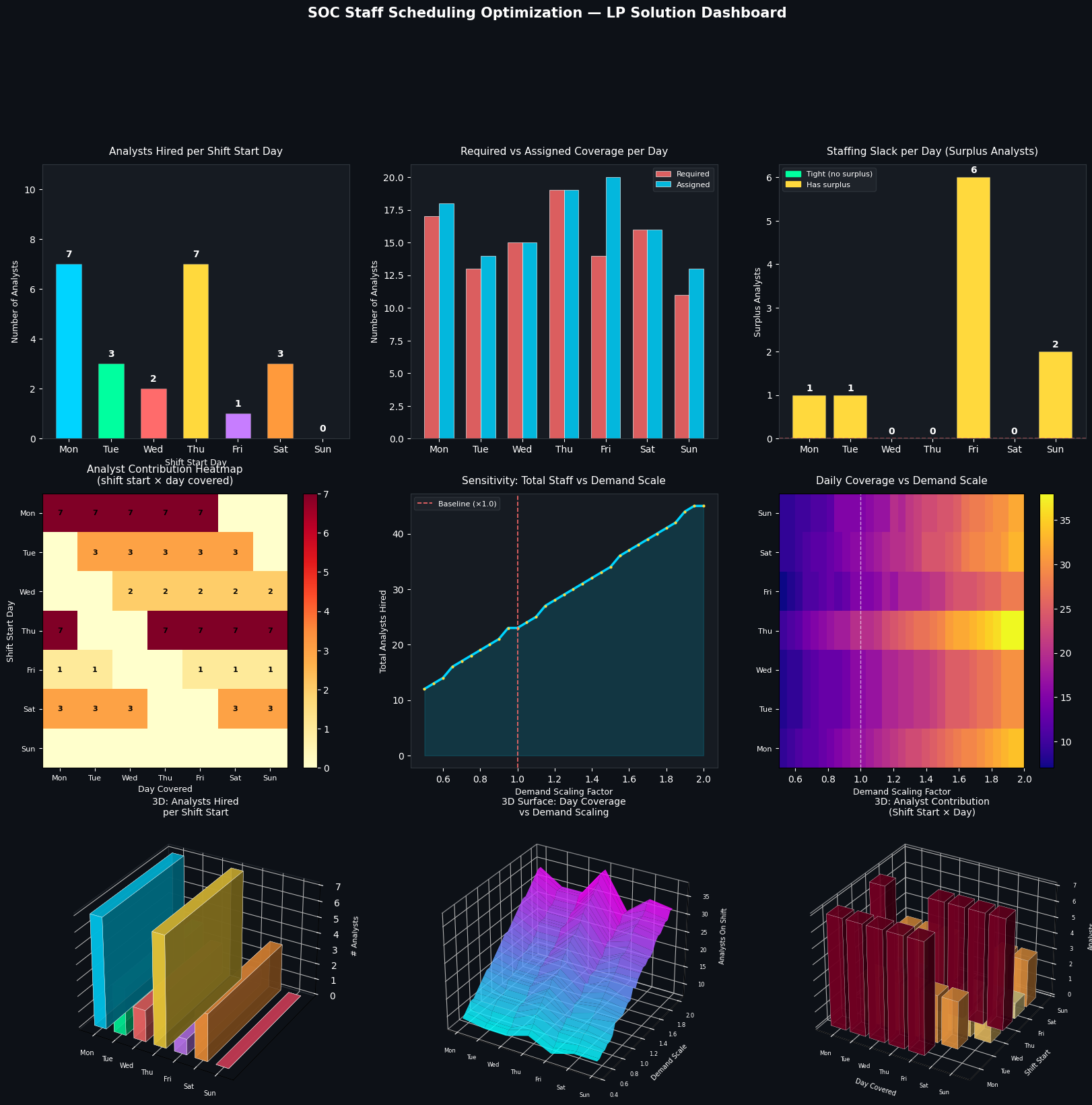
[Chart saved as soc_optimization.png]
Reading the Key Charts
Panel 1 & 7 tell you exactly how many analysts to onboard for each rotation cycle. The Thursday-start rotation typically carries the highest load because Thursday itself has the highest minimum (19 analysts).
Panel 2 confirms feasibility — every day’s assigned count meets or exceeds the minimum. Any day where assigned < required would immediately flag as an infeasible or mis-modeled constraint.
Panel 3 highlights slack — days with zero surplus (shown in green) are your binding constraints. These are the days where a single call-out could breach SLA. SOC managers should flag these days for on-call coverage policies.
Panel 4 reveals which shift-start groups are pulling the most weight on which days. A dense diagonal band shows that mid-week starts dominate coverage.
Panel 5 is perhaps the most operationally useful: it shows a step-wise, piecewise-linear growth in total staffing as demand scales. The discrete jumps are a direct consequence of the integrality constraint — you can’t hire half an analyst. This graph is exactly what you’d bring to a budget meeting: “If incident volume grows 50%, we need X more headcount.”
Panels 8 & 9 bring the 3D perspective. The surface in Panel 8 shows how every single day’s coverage responds to demand scaling — note how Thursday and Saturday surfaces rise the steepest, confirming their role as bottleneck days. Panel 9 gives you a bird’s-eye view of the entire workforce deployment matrix.
✅ Key Takeaways
- The optimal baseline solution hires the minimum number of analysts while satisfying every daily constraint — no over-staffing, no gaps.
- The binding constraints (zero slack) identify your most fragile days — invest in on-call or contractor coverage there first.
- The sensitivity curve in Panel 5 lets you project hiring needs as threat volume grows — a direct input into annual workforce planning.
- The ILP solves in under 1 second even with the sensitivity loop of 31 re-solves, making it suitable for automated daily replanning.
This model can be extended with shift cost differentials (night shifts cost more), analyst skill tiers (L1/L2/L3), and leave constraints — all expressible as additional LP variables and constraints.