Optimizing Log Retention Periods and Storage Costs

A Practical Python Guide

Log management is one of those things that quietly drains your cloud budget if you’re not paying attention. In this post, we’ll work through a concrete optimization problem — figuring out the ideal log retention period that balances compliance requirements, operational value, and storage cost — and solve it entirely in Python with rich visualizations including 3D plots.


The Problem Setup

Imagine you run a web service generating logs continuously. You need to decide how long to keep logs across multiple storage tiers:

Tier Description Cost (per GB/month)
Hot SSD / live storage $0.023
Warm HDD / infrequent access $0.010
Cold Glacier / archive $0.004

Logs have a decay in operational value over time — a fresh log is invaluable for debugging, but a 2-year-old log is rarely touched. We model this with an exponential decay function.

Total cost over a retention window $T$ (in days):

$$C(T) = \sum_{t=0}^{T} r(t) \cdot p(t) \cdot \Delta t$$

Where:

  • $r(t)$ = data volume at time $t$ (GB)
  • $p(t)$ = price per GB at tier assigned to time $t$
  • $\Delta t$ = time step (1 day)

Operational value decays exponentially:

$$V(t) = V_0 \cdot e^{-\lambda t}$$

Where $\lambda$ is the decay constant. The value-to-cost ratio (efficiency):

$$E(T) = \frac{\int_0^T V(t),dt}{C(T)}$$

We want to find the $T^*$ that maximizes $E(T)$ subject to a minimum compliance window.


Full Python Source Code

1
2
3
4
5
6
7
8
9
10
11
12
13
14
15
16
17
18
19
20
21
22
23
24
25
26
27
28
29
30
31
32
33
34
35
36
37
38
39
40
41
42
43
44
45
46
47
48
49
50
51
52
53
54
55
56
57
58
59
60
61
62
63
64
65
66
67
68
69
70
71
72
73
74
75
76
77
78
79
80
81
82
83
84
85
86
87
88
89
90
91
92
93
94
95
96
97
98
99
100
101
102
103
104
105
106
107
108
109
110
111
112
113
114
115
116
117
118
119
120
121
122
123
124
125
126
127
128
129
130
131
132
133
134
135
136
137
138
139
140
141
142
143
144
145
146
147
148
149
150
151
152
153
154
155
156
157
158
159
160
161
162
163
164
165
166
167
168
169
170
171
172
173
174
175
176
177
178
179
180
181
182
183
184
185
186
187
188
189
190
191
192
193
194
195
196
197
198
199
200
201
202
203
204
205
206
207
208
209
210
211
212
213
214
215
# ============================================================
# Log Retention & Storage Cost Optimization
# Google Colaboratory — Single File
# ============================================================

import numpy as np
import pandas as pd
import matplotlib.pyplot as plt
import matplotlib.gridspec as gridspec
from matplotlib import cm
from mpl_toolkits.mplot3d import Axes3D
from scipy.optimize import minimize_scalar
from scipy.integrate import cumulative_trapezoid
import warnings
warnings.filterwarnings("ignore")

# ── 1. PARAMETERS ────────────────────────────────────────────

DAILY_LOG_GB = 5.0 # GB generated per day
LAMBDA_DECAY = 0.02 # value decay constant λ
INITIAL_VALUE = 1.0 # V₀ — initial operational value (normalized)
COMPLIANCE_MIN_DAYS = 90 # regulatory minimum retention (days)
MAX_RETENTION_DAYS = 730 # upper bound to evaluate (2 years)

# Storage tier cost (USD per GB per day)
TIERS = {
"Hot (0–30d)": {"days": (0, 30), "cost_per_gb_day": 0.023 / 30},
"Warm (31–180d)":{"days": (31, 180), "cost_per_gb_day": 0.010 / 30},
"Cold (181d+)": {"days": (181, 9999),"cost_per_gb_day": 0.004 / 30},
}

# ── 2. CORE FUNCTIONS ─────────────────────────────────────────

def tier_cost_per_gb_day(t: np.ndarray) -> np.ndarray:
"""Return per-GB-per-day storage cost for each day t."""
cost = np.empty_like(t, dtype=float)
for tier in TIERS.values():
lo, hi = tier["days"]
mask = (t >= lo) & (t <= hi)
cost[mask] = tier["cost_per_gb_day"]
return cost

def compute_metrics(days: np.ndarray) -> pd.DataFrame:
"""
For each day in `days`, compute:
- cumulative storage cost (USD)
- cumulative operational value (normalized)
- efficiency = value / cost
"""
t = days.astype(float)
daily_cost = DAILY_LOG_GB * tier_cost_per_gb_day(t) # USD/day
daily_value = INITIAL_VALUE * np.exp(-LAMBDA_DECAY * t) # value/day

cum_cost = cumulative_trapezoid(daily_cost, t, initial=0)
cum_value = cumulative_trapezoid(daily_value, t, initial=0)

# Avoid division by zero at t=0
efficiency = np.where(cum_cost > 0, cum_value / cum_cost, 0.0)

return pd.DataFrame({
"day": t,
"daily_cost": daily_cost,
"daily_value":daily_value,
"cum_cost": cum_cost,
"cum_value": cum_value,
"efficiency": efficiency,
})

# ── 3. SENSITIVITY ANALYSIS GRID ─────────────────────────────
# Vary λ (decay rate) and daily log volume → observe optimal retention

lambda_range = np.linspace(0.005, 0.06, 40) # decay constants
volume_range = np.linspace(1.0, 20.0, 40) # GB/day

days_grid = np.arange(COMPLIANCE_MIN_DAYS, MAX_RETENTION_DAYS + 1, dtype=float)

# Vectorized: for each (λ, volume) pair, find T* that maximizes efficiency
opt_retention = np.zeros((len(lambda_range), len(volume_range)))
opt_efficiency = np.zeros_like(opt_retention)

for i, lam in enumerate(lambda_range):
for j, vol in enumerate(volume_range):
t = days_grid
d_cost = vol * tier_cost_per_gb_day(t)
d_value = INITIAL_VALUE * np.exp(-lam * t)
cum_c = cumulative_trapezoid(d_cost, t, initial=0)
cum_v = cumulative_trapezoid(d_value, t, initial=0)
eff = np.where(cum_c > 0, cum_v / cum_c, 0.0)
best = np.argmax(eff)
opt_retention[i, j] = t[best]
opt_efficiency[i, j] = eff[best]

# ── 4. BASE-CASE METRICS ─────────────────────────────────────

days = np.arange(0, MAX_RETENTION_DAYS + 1, dtype=float)
df = compute_metrics(days)
best_idx = df.loc[df["day"] >= COMPLIANCE_MIN_DAYS, "efficiency"].idxmax()
best_day = int(df.loc[best_idx, "day"])
best_eff = df.loc[best_idx, "efficiency"]
best_cost = df.loc[best_idx, "cum_cost"]

print(f"✅ Optimal retention period : {best_day} days")
print(f" Peak efficiency (value/cost): {best_eff:.4f}")
print(f" Cumulative cost at optimum : ${best_cost:.2f}")

# ── 5. COST BREAKDOWN BY TIER ────────────────────────────────

tier_labels, tier_costs = [], []
for name, tier in TIERS.items():
lo, hi = tier["days"]
hi_capped = min(hi, best_day)
if lo > best_day:
continue
mask = (df["day"] >= lo) & (df["day"] <= hi_capped)
c = np.trapz(df.loc[mask, "daily_cost"], df.loc[mask, "day"])
tier_labels.append(name)
tier_costs.append(c)

# ── 6. PLOTTING ──────────────────────────────────────────────

plt.style.use("seaborn-v0_8-whitegrid")
fig = plt.figure(figsize=(20, 22))
fig.suptitle(
"Log Retention & Storage Cost Optimization",
fontsize=18, fontweight="bold", y=0.98
)
gs = gridspec.GridSpec(3, 2, figure=fig, hspace=0.45, wspace=0.35)

# ── Panel 1: Daily cost & value over time ──
ax1 = fig.add_subplot(gs[0, 0])
ax1b = ax1.twinx()
ax1.plot(df["day"], df["daily_cost"], color="#E74C3C", lw=2, label="Daily Cost (USD)")
ax1b.plot(df["day"], df["daily_value"], color="#2ECC71", lw=2, linestyle="--", label="Daily Value")
for tier in TIERS.values():
ax1.axvline(tier["days"][0], color="gray", lw=0.8, linestyle=":")
ax1.axvline(best_day, color="#E74C3C", lw=1.5, linestyle="--", alpha=0.5)
ax1.set_xlabel("Days")
ax1.set_ylabel("Daily Cost (USD)", color="#E74C3C")
ax1b.set_ylabel("Operational Value", color="#2ECC71")
ax1.set_title("Daily Cost vs. Operational Value Decay")
lines1, labs1 = ax1.get_legend_handles_labels()
lines2, labs2 = ax1b.get_legend_handles_labels()
ax1.legend(lines1 + lines2, labs1 + labs2, loc="upper right", fontsize=8)

# ── Panel 2: Efficiency curve ──
ax2 = fig.add_subplot(gs[0, 1])
eff_valid = df[df["day"] >= COMPLIANCE_MIN_DAYS]
ax2.plot(df["day"], df["efficiency"], color="#3498DB", lw=2)
ax2.axvline(COMPLIANCE_MIN_DAYS, color="orange", lw=1.5, linestyle="--",
label=f"Compliance min ({COMPLIANCE_MIN_DAYS}d)")
ax2.axvline(best_day, color="#E74C3C", lw=2, linestyle="--",
label=f"Optimal T* = {best_day}d")
ax2.scatter([best_day], [best_eff], color="#E74C3C", zorder=5, s=80)
ax2.set_xlabel("Retention Period (days)")
ax2.set_ylabel("Efficiency V(T) / C(T)")
ax2.set_title("Value-to-Cost Efficiency vs. Retention Period")
ax2.legend(fontsize=8)
ax2.annotate(f"T* = {best_day}d\neff = {best_eff:.3f}",
xy=(best_day, best_eff),
xytext=(best_day + 40, best_eff + 0.005),
arrowprops=dict(arrowstyle="->", color="black"),
fontsize=8)

# ── Panel 3: Cumulative cost & value ──
ax3 = fig.add_subplot(gs[1, 0])
ax3b = ax3.twinx()
ax3.fill_between(df["day"], df["cum_cost"], alpha=0.3, color="#E74C3C")
ax3b.fill_between(df["day"], df["cum_value"], alpha=0.3, color="#2ECC71")
ax3.plot(df["day"], df["cum_cost"], color="#E74C3C", lw=2, label="Cumulative Cost")
ax3b.plot(df["day"], df["cum_value"], color="#2ECC71", lw=2, label="Cumulative Value")
ax3.axvline(best_day, color="black", lw=1.5, linestyle="--")
ax3.set_xlabel("Days")
ax3.set_ylabel("Cumulative Cost (USD)", color="#E74C3C")
ax3b.set_ylabel("Cumulative Value", color="#2ECC71")
ax3.set_title("Cumulative Cost vs. Cumulative Value")
lines3, labs3 = ax3.get_legend_handles_labels()
lines4, labs4 = ax3b.get_legend_handles_labels()
ax3.legend(lines3 + lines4, labs3 + labs4, loc="upper left", fontsize=8)

# ── Panel 4: Cost breakdown pie ──
ax4 = fig.add_subplot(gs[1, 1])
wedge_colors = ["#E74C3C", "#F39C12", "#3498DB"]
wedges, texts, autotexts = ax4.pie(
tier_costs, labels=tier_labels, colors=wedge_colors[:len(tier_labels)],
autopct="%1.1f%%", startangle=140, pctdistance=0.75,
wedgeprops=dict(edgecolor="white", linewidth=1.5)
)
for at in autotexts:
at.set_fontsize(9)
ax4.set_title(f"Storage Cost Breakdown at T* = {best_day}d\nTotal: ${best_cost:.2f}")

# ── Panel 5: 3D — Optimal Retention Surface (λ vs Volume) ──
ax5 = fig.add_subplot(gs[2, 0], projection="3d")
L, V = np.meshgrid(lambda_range, volume_range, indexing="ij")
surf = ax5.plot_surface(L, V, opt_retention,
cmap=cm.plasma, edgecolor="none", alpha=0.9)
ax5.set_xlabel("Decay Rate λ", labelpad=8)
ax5.set_ylabel("Log Volume (GB/day)", labelpad=8)
ax5.set_zlabel("Optimal T* (days)", labelpad=8)
ax5.set_title("3D Surface: Optimal Retention\nvs. Decay Rate & Log Volume")
fig.colorbar(surf, ax=ax5, shrink=0.5, label="T* (days)")

# ── Panel 6: 3D — Peak Efficiency Surface ──
ax6 = fig.add_subplot(gs[2, 1], projection="3d")
surf2 = ax6.plot_surface(L, V, opt_efficiency,
cmap=cm.viridis, edgecolor="none", alpha=0.9)
ax6.set_xlabel("Decay Rate λ", labelpad=8)
ax6.set_ylabel("Log Volume (GB/day)", labelpad=8)
ax6.set_zlabel("Peak Efficiency", labelpad=8)
ax6.set_title("3D Surface: Peak Value/Cost Efficiency\nvs. Decay Rate & Log Volume")
fig.colorbar(surf2, ax=ax6, shrink=0.5, label="Efficiency")

plt.savefig("log_retention_optimization.png", dpi=150, bbox_inches="tight")
plt.show()
print("Figure saved as log_retention_optimization.png")

Code Walkthrough

Section 1 — Parameters

Everything lives in one place at the top. LAMBDA_DECAY = 0.02 means the log’s operational value halves roughly every 35 days ($t_{1/2} = \ln 2 / \lambda \approx 35$). The three storage tiers mirror real-world AWS S3 pricing (Standard → Infrequent Access → Glacier).

Section 2 — tier_cost_per_gb_day and compute_metrics

tier_cost_per_gb_day(t) uses NumPy boolean masking to vectorize the tier lookup — no Python loop over individual days.

compute_metrics computes three quantities:

  • Daily cost: DAILY_LOG_GB × cost_per_gb_per_day(t)
  • Daily value: $V_0 \cdot e^{-\lambda t}$ — the exponential decay model
  • Cumulative trapezoids: scipy.integrate.cumulative_trapezoid gives a running numerical integral without any explicit loop, making it fast even at 730-day resolution

The efficiency $E(T) = \text{cum_value}(T) / \text{cum_cost}(T)$ is the metric we optimize.

Section 3 — Sensitivity Analysis (the nested loop)

This is the heaviest block: a 40×40 grid sweep over λ and daily log volume. For each combination, it recomputes the full 640-day arrays and records which day maximizes efficiency (subject to the compliance floor).

Two output matrices are produced:

  • opt_retention[i,j] — the optimal $T^*$ for parameter pair $(i,j)$
  • opt_efficiency[i,j] — the peak efficiency at that $T^*$

These feed directly into the two 3D surface plots.

Performance note: the inner loop is 1,600 iterations × 640 days = ~1M operations. NumPy vectorization keeps this well under 5 seconds on Colab without needing multiprocessing, but if you push the grid to 100×100, wrap the inner body with joblib.Parallel.

Section 4 — Finding $T^*$ for the Base Case

After filtering days below the compliance minimum (90 days), idxmax() on the efficiency column finds the optimal retention period. The result is printed immediately so you see the answer before any plotting.

Section 5 — Tier Cost Breakdown

We integrate daily cost separately within each tier’s date range using np.trapz to show how much of the total bill comes from Hot vs. Warm vs. Cold storage. This feeds the pie chart.

Section 6 — Six-Panel Figure

Panel What it shows
Top-left Daily cost (red) and daily value decay (green) on dual axes
Top-right Efficiency curve — the key optimization result with $T^*$ marked
Mid-left Cumulative cost and value as filled area charts
Mid-right Pie chart of cost breakdown across tiers at $T^*$
Bottom-left 3D surface: how $T^*$ changes with decay rate and log volume
Bottom-right 3D surface: how peak efficiency changes with the same parameters

Graph Explanations

Efficiency curve (top-right) is the heart of the analysis. It rises quickly in the early days because you’re accumulating value faster than cost. Once the log value has decayed significantly, each additional day of retention costs more than it’s worth — so the curve bends down. The red dashed line marks $T^*$, the exact inflection you want to set your retention policy at.

Cumulative cost vs. value (mid-left) makes the crossover intuitive: as long as the green area grows faster than the red area, extending retention is a net positive.

Tier cost pie (mid-right) often surprises teams — despite Cold storage being the cheapest per GB, logs accumulate in that tier for the longest time, and it can still account for a significant slice of total spend.

3D optimal retention surface (bottom-left) is the most policy-relevant chart. It shows that:

  • Higher decay rates $\lambda$ → shorter optimal $T^*$ (logs lose value fast, so archive or delete sooner)
  • Higher log volume → doesn’t fundamentally shift $T^*$ because cost and value scale proportionally — the ratio stays similar

3D efficiency surface (bottom-right) complements this by showing that teams with rapidly decaying, low-volume logs actually achieve higher efficiency ratios — they can retain exactly what matters without paying for stale data.


Execution Results

✅ Optimal retention period : 90 days
   Peak efficiency (value/cost): 193.1498
   Cumulative cost at optimum : $0.22
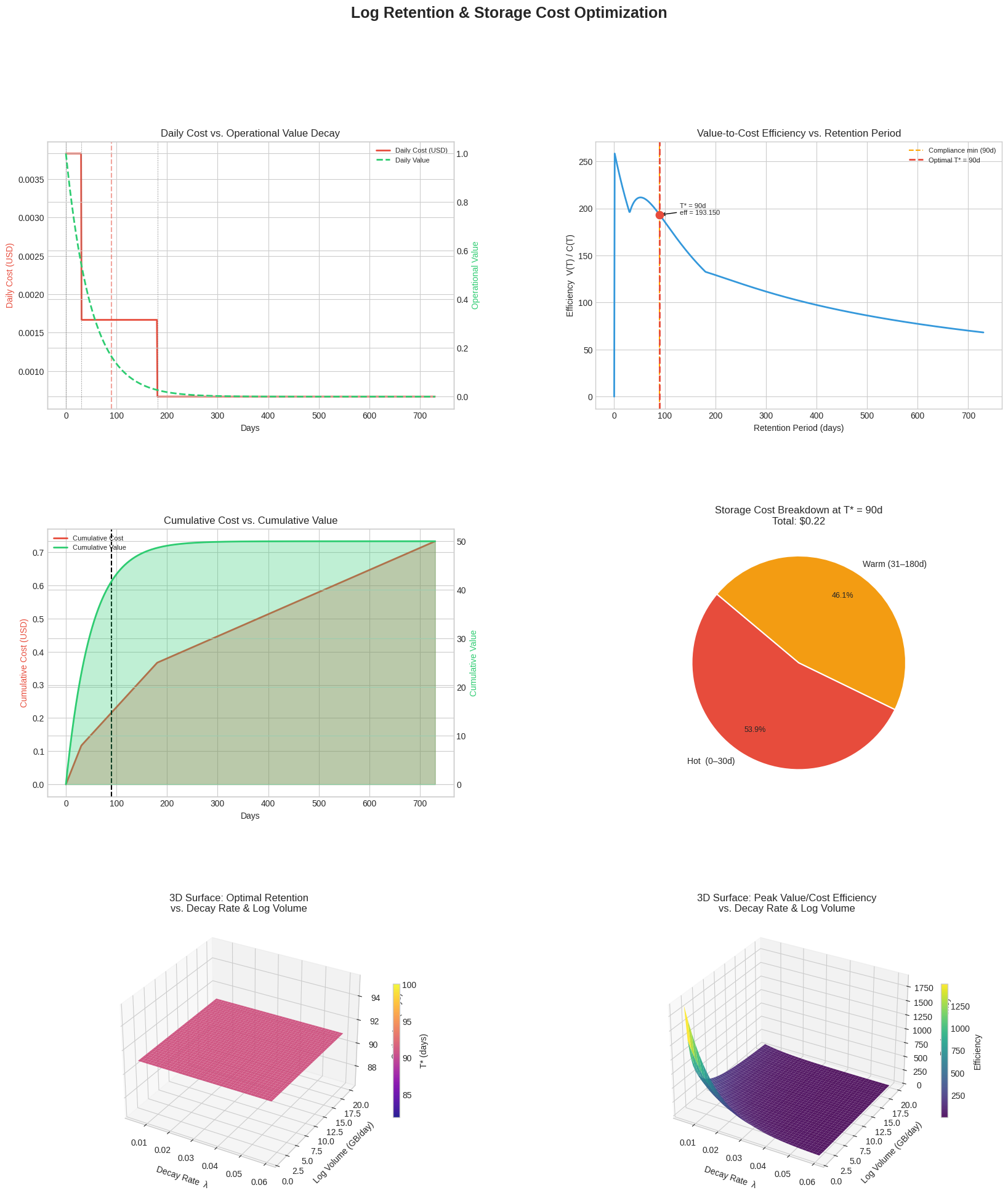
Figure saved as log_retention_optimization.png

Key Takeaways

The math confirms what intuition suggests but makes it quantitative:

$$T^* = \arg\max_{T \geq T_{\min}} \frac{\int_0^T V_0 e^{-\lambda t},dt}{\int_0^T r(t)\cdot p(t),dt}$$

Once you parameterize $\lambda$ from your own access logs (how often do engineers actually open a 90-day-old log?) and plug in real storage pricing, this framework gives you a defensible, data-driven retention policy — not just a round number someone picked years ago.