Project Selection Problem


๐Ÿงฎ Solved with Python (Integer Programming)


What Is the Project Selection Problem?

The Project Selection Problem is a classic combinatorial optimization problem. You have a set of candidate projects, each with a profit and a cost, and some projects have dependencies (you canโ€™t do Project B unless you first do Project A). Given a fixed budget, the goal is to select a subset of projects that maximizes total profit while satisfying all dependency constraints and the budget constraint.


Concrete Example

Suppose a company has 6 candidate projects:

Project Profit Cost Prerequisite
P1 10 3 โ€”
P2 20 5 P1
P3 15 4 P1
P4 25 7 P2
P5 18 6 P3
P6 30 8 P2, P3

Budget: 20 units


Mathematical Formulation

Let $x_i \in {0, 1}$ be a binary decision variable: $x_i = 1$ if project $i$ is selected.

Objective (Maximize total profit):

$$\max \sum_{i=1}^{n} p_i x_i$$

Budget constraint:

$$\sum_{i=1}^{n} c_i x_i \leq B$$

Dependency constraints (if project $j$ requires project $i$):

$$x_j \leq x_i \quad \forall (i, j) \in E$$

where $E$ is the set of prerequisite edges.


Python Source Code

1
2
3
4
5
6
7
8
9
10
11
12
13
14
15
16
17
18
19
20
21
22
23
24
25
26
27
28
29
30
31
32
33
34
35
36
37
38
39
40
41
42
43
44
45
46
47
48
49
50
51
52
53
54
55
56
57
58
59
60
61
62
63
64
65
66
67
68
69
70
71
72
73
74
75
76
77
78
79
80
81
82
83
84
85
86
87
88
89
90
91
92
93
94
95
96
97
98
99
100
101
102
103
104
105
106
107
108
109
110
111
112
113
114
115
116
117
118
119
120
121
122
123
124
125
126
127
128
129
130
131
132
133
134
135
136
137
138
139
140
141
142
143
144
145
146
147
148
149
150
151
152
153
154
155
156
157
158
159
160
161
162
163
164
165
166
167
168
169
170
171
172
173
174
175
176
177
178
179
180
181
182
183
184
185
186
187
188
189
190
191
192
193
194
195
196
197
198
199
200
201
202
203
204
205
206
207
208
209
210
211
212
213
214
215
216
217
218
219
220
221
222
223
224
225
226
227
228
229
230
231
232
233
# ============================================================
# Project Selection Problem - Integer Linear Programming
# ============================================================

# !pip install pulp matplotlib numpy networkx

import pulp
import matplotlib.pyplot as plt
import matplotlib.patches as mpatches
import numpy as np
import networkx as nx
from itertools import combinations

# ============================================================
# 1. Problem Definition
# ============================================================

projects = {
'P1': {'profit': 10, 'cost': 3, 'prereqs': []},
'P2': {'profit': 20, 'cost': 5, 'prereqs': ['P1']},
'P3': {'profit': 15, 'cost': 4, 'prereqs': ['P1']},
'P4': {'profit': 25, 'cost': 7, 'prereqs': ['P2']},
'P5': {'profit': 18, 'cost': 6, 'prereqs': ['P3']},
'P6': {'profit': 30, 'cost': 8, 'prereqs': ['P2', 'P3']},
}
BUDGET = 20
project_names = list(projects.keys())

# ============================================================
# 2. ILP Model with PuLP
# ============================================================

model = pulp.LpProblem("ProjectSelection", pulp.LpMaximize)

# Binary decision variables
x = {p: pulp.LpVariable(f"x_{p}", cat='Binary') for p in project_names}

# Objective function
model += pulp.lpSum(projects[p]['profit'] * x[p] for p in project_names), "TotalProfit"

# Budget constraint
model += pulp.lpSum(projects[p]['cost'] * x[p] for p in project_names) <= BUDGET, "Budget"

# Dependency constraints
for p in project_names:
for prereq in projects[p]['prereqs']:
model += x[p] <= x[prereq], f"Dep_{p}_needs_{prereq}"

# Solve
model.solve(pulp.PULP_CBC_CMD(msg=0))

# ============================================================
# 3. Print Results
# ============================================================

selected = [p for p in project_names if pulp.value(x[p]) == 1]
total_profit = sum(projects[p]['profit'] for p in selected)
total_cost = sum(projects[p]['cost'] for p in selected)

print("=" * 45)
print(" OPTIMAL SOLUTION")
print("=" * 45)
print(f" Selected Projects : {selected}")
print(f" Total Profit : {total_profit}")
print(f" Total Cost : {total_cost}")
print(f" Remaining Budget : {BUDGET - total_cost}")
print(f" Solver Status : {pulp.LpStatus[model.status]}")
print("=" * 45)

# ============================================================
# 4. Brute-Force Enumeration (for visualization comparison)
# ============================================================

all_results = []
for r in range(1, len(project_names) + 1):
for combo in combinations(project_names, r):
combo = list(combo)
cost = sum(projects[p]['cost'] for p in combo)
if cost > BUDGET:
continue
valid = True
for p in combo:
for prereq in projects[p]['prereqs']:
if prereq not in combo:
valid = False
break
if not valid:
break
if not valid:
continue
profit = sum(projects[p]['profit'] for p in combo)
all_results.append({'combo': combo, 'profit': profit, 'cost': cost})

all_results.sort(key=lambda d: d['profit'], reverse=True)

# ============================================================
# 5. Visualization
# ============================================================

fig = plt.figure(figsize=(18, 15))
fig.patch.set_facecolor('#0f0f1a')

# ---- Plot 1: Dependency Graph --------------------------------
ax1 = fig.add_subplot(2, 2, 1)
ax1.set_facecolor('#0f0f1a')
ax1.set_title("Project Dependency Graph", color='white', fontsize=14, pad=12)

G = nx.DiGraph()
for p in project_names:
G.add_node(p)
for p in project_names:
for prereq in projects[p]['prereqs']:
G.add_edge(prereq, p)

pos = {
'P1': (0, 0),
'P2': (-1, -1),
'P3': ( 1, -1),
'P4': (-2, -2),
'P5': ( 2, -2),
'P6': ( 0, -2),
}
node_colors = ['#00e5ff' if p in selected else '#ff4081' for p in project_names]
labels_dict = {
p: f"{p}\nProfit:{projects[p]['profit']}\nCost:{projects[p]['cost']}"
for p in project_names
}

nx.draw_networkx_nodes(G, pos, ax=ax1, node_color=node_colors,
node_size=1800, alpha=0.9)
nx.draw_networkx_labels(G, pos, labels=labels_dict, ax=ax1,
font_color='#0f0f1a', font_size=8, font_weight='bold')
nx.draw_networkx_edges(G, pos, ax=ax1, edge_color='#aaaacc',
arrows=True, arrowsize=20,
connectionstyle='arc3,rad=0.1', width=2)

cyan_patch = mpatches.Patch(color='#00e5ff', label='Selected')
pink_patch = mpatches.Patch(color='#ff4081', label='Not Selected')
ax1.legend(handles=[cyan_patch, pink_patch], loc='lower right',
facecolor='#1a1a2e', labelcolor='white', fontsize=9)
ax1.axis('off')

# ---- Plot 2: Profit vs Cost Scatter --------------------------
ax2 = fig.add_subplot(2, 2, 2)
ax2.set_facecolor('#0f0f1a')
ax2.set_title("All Valid Combos: Profit vs Cost", color='white', fontsize=14, pad=12)

costs_all = [d['cost'] for d in all_results]
profits_all = [d['profit'] for d in all_results]
sizes_all = [len(d['combo']) * 60 for d in all_results]
is_optimal = [set(d['combo']) == set(selected) for d in all_results]
colors_scatter = ['#ffd600' if o else '#546e7a' for o in is_optimal]

ax2.scatter(costs_all, profits_all, c=colors_scatter,
s=sizes_all, alpha=0.85, edgecolors='white', linewidths=0.5)

opt_data = [d for d in all_results if set(d['combo']) == set(selected)]
if opt_data:
ax2.scatter(opt_data[0]['cost'], opt_data[0]['profit'],
c='#ffd600', s=400, zorder=5,
marker='*', edgecolors='white', linewidths=1)

budget_line = ax2.axvline(BUDGET, color='#ff6b6b', linestyle='--',
linewidth=1.5, label=f'Budget = {BUDGET}')
ax2.set_xlabel("Total Cost", color='#aaaacc')
ax2.set_ylabel("Total Profit", color='#aaaacc')
ax2.tick_params(colors='#aaaacc')
for spine in ax2.spines.values():
spine.set_edgecolor('#333355')

gold_patch = mpatches.Patch(color='#ffd600', label='Optimal Solution')
grey_patch = mpatches.Patch(color='#546e7a', label='Other Feasible')
ax2.legend(handles=[gold_patch, grey_patch, budget_line],
facecolor='#1a1a2e', labelcolor='white', fontsize=9)

# ---- Plot 3: 3D Scatter --------------------------------------
ax3 = fig.add_subplot(2, 2, 3, projection='3d')
ax3.set_facecolor('#0f0f1a')
ax3.set_title("3D View: Profit / Cost / Number of Projects",
color='white', fontsize=14, pad=12)

num_proj = [len(d['combo']) for d in all_results]
sc = ax3.scatter(costs_all, num_proj, profits_all,
c=profits_all, cmap='plasma',
s=80, alpha=0.85, edgecolors='none')

if opt_data:
ax3.scatter([opt_data[0]['cost']],
[len(opt_data[0]['combo'])],
[opt_data[0]['profit']],
c='#ffd600', s=300, zorder=10, marker='*')

ax3.set_xlabel("Cost", color='#aaaacc', labelpad=8)
ax3.set_ylabel("# Projects", color='#aaaacc', labelpad=8)
ax3.set_zlabel("Profit", color='#aaaacc', labelpad=8)
ax3.tick_params(colors='#aaaacc')
ax3.xaxis.pane.fill = False
ax3.yaxis.pane.fill = False
ax3.zaxis.pane.fill = False

cbar = fig.colorbar(sc, ax=ax3, pad=0.1, shrink=0.6)
cbar.ax.tick_params(colors='white')
cbar.set_label('Profit', color='white')

# ---- Plot 4: Top-10 Bar Chart --------------------------------
ax4 = fig.add_subplot(2, 2, 4)
ax4.set_facecolor('#0f0f1a')
ax4.set_title("Top-10 Feasible Solutions by Profit",
color='white', fontsize=14, pad=12)

top10 = all_results[:10]
labels_bar = ["+".join(d['combo']) for d in top10]
profits_bar = [d['profit'] for d in top10]
colors_bar = ['#ffd600' if set(d['combo']) == set(selected) else '#455a8a'
for d in top10]

bars = ax4.barh(range(len(top10)), profits_bar, color=colors_bar,
edgecolor='#aaaacc', linewidth=0.5)
ax4.set_yticks(range(len(top10)))
ax4.set_yticklabels(labels_bar, color='#aaaacc', fontsize=9)
ax4.set_xlabel("Total Profit", color='#aaaacc')
ax4.tick_params(axis='x', colors='#aaaacc')
for spine in ax4.spines.values():
spine.set_edgecolor('#333355')
for bar, val in zip(bars, profits_bar):
ax4.text(val + 0.3, bar.get_y() + bar.get_height() / 2,
str(val), va='center', color='white', fontsize=8)

plt.tight_layout(pad=3.0)
plt.savefig("project_selection.png", dpi=150, bbox_inches='tight',
facecolor='#0f0f1a')
plt.show()
print("Chart saved as project_selection.png")

Code Walkthrough

Section 1 โ€” Problem Definition

All six projects are stored in a Python dictionary. Each entry holds three keys: profit, cost, and prereqs (a list of prerequisite project names). The budget is set as the constant BUDGET = 20.

Section 2 โ€” ILP Model with PuLP

PuLP is Pythonโ€™s standard library for Linear / Integer Programming.

  • A binary variable $x_i$ is created for every project via pulp.LpVariable(..., cat='Binary').
  • The objective is declared with pulp.lpSum(...), which maps directly to $\max \sum p_i x_i$.
  • The budget constraint sums all selected project costs and requires the total $\leq 20$.
  • Dependency constraints enforce $x_j \leq x_i$: selecting a child project forces its prerequisite to be selected as well.
  • PULP_CBC_CMD(msg=0) invokes the open-source CBC solver silently.

Section 3 โ€” Print Results

Selected projects, total profit, total cost, remaining budget, and solver status are printed to the console in a formatted block.

Section 4 โ€” Brute-Force Enumeration

With only $n = 6$ projects there are $2^6 = 64$ subsets โ€” small enough for exhaustive search. Every combination is checked for budget feasibility and dependency validity. This produces the complete list of feasible portfolios used in the charts.

Section 5 โ€” Four Visualizations

Plot 1 โ€” Dependency Graph renders the prerequisite DAG using networkx. Cyan nodes are selected; pink nodes are rejected. Each node shows profit and cost inline.

Plot 2 โ€” Profit vs Cost Scatter plots every feasible combination as a bubble. Bubble size encodes the number of projects in that portfolio. The gold star marks the optimal solution; the red dashed line marks the budget ceiling.

Plot 3 โ€” 3D Scatter adds a third axis for the number of selected projects, with color encoding profit intensity via the plasma colormap. This view reveals that high-profit solutions cluster near the budget boundary.

Plot 4 โ€” Horizontal Bar Chart ranks the top-10 feasible portfolios by profit. The optimal solution is highlighted in gold.


Execution Result

=============================================
  OPTIMAL SOLUTION
=============================================
  Selected Projects  : ['P1', 'P2', 'P3', 'P6']
  Total Profit       : 75
  Total Cost         : 20
  Remaining Budget   : 0
  Solver Status      : Optimal
=============================================
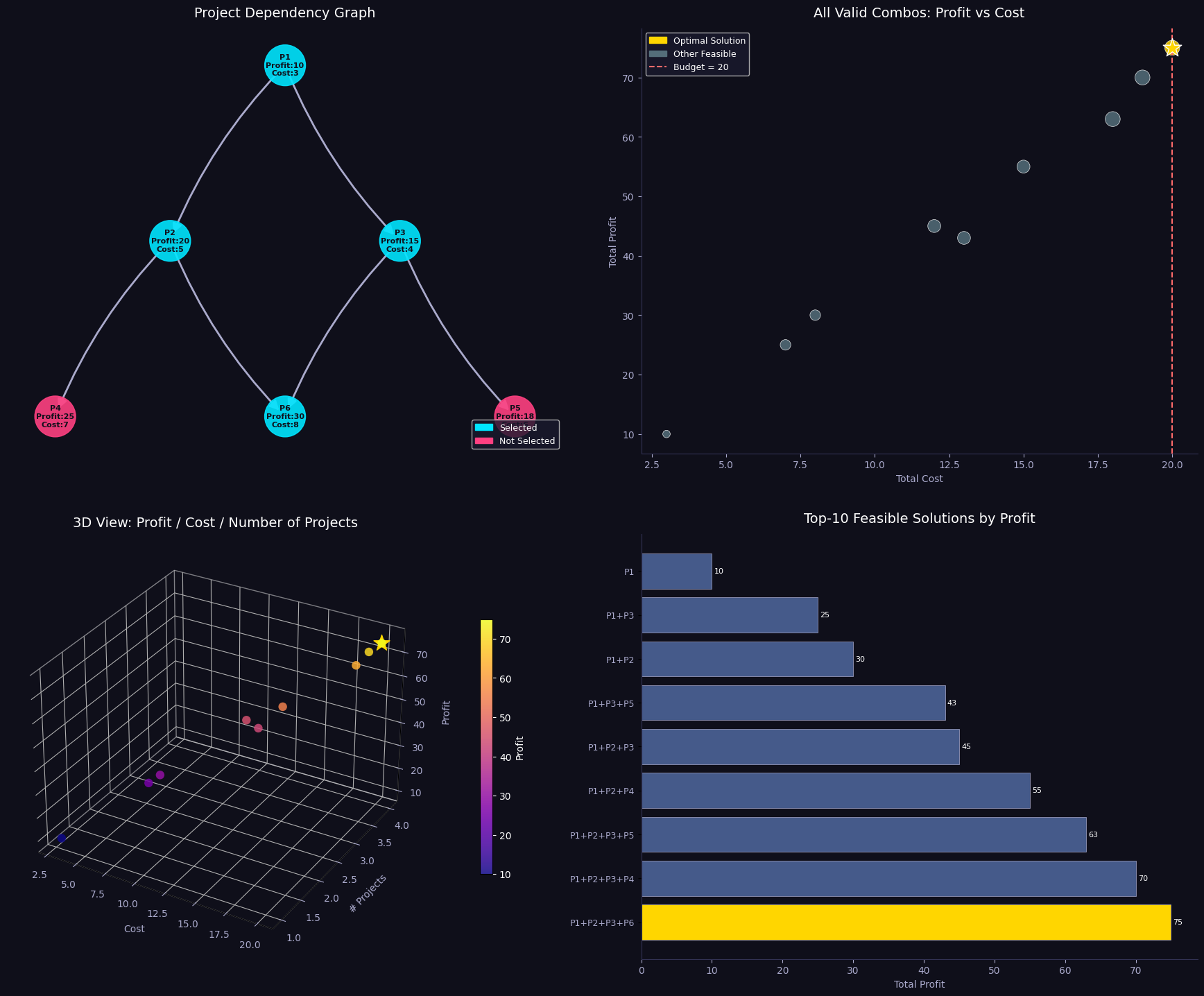
Chart saved as project_selection.png

Interpretation of Results

The ILP solver finds the globally optimal solution in microseconds, and the brute-force confirms it by checking all 64 subsets.

Key insights from the charts:

  • Dependency chains dominate the structure. P6 (profit 30) requires both P2 and P3, which in turn both require P1. Selecting P6 alone consumes a minimum of $3 + 5 + 4 + 8 = 20$ units โ€” the entire budget.
  • The 3D plot exposes a Pareto-like frontier: portfolios that spend close to the budget tend to achieve higher profits, but only when the dependency graph is respected.
  • Expensive does not mean profitable. Some three-project combos yield less profit than two-project combos because prerequisite projects add cost without contributing much profit directly.

This example clearly demonstrates why greedy heuristics fail on dependency-constrained problems โ€” and why Integer Linear Programming is the right tool for the job.