A Deep Dive with Visualizations
The 0/1 Knapsack Problem is one of the most famous combinatorial optimization problems in computer science. The goal is simple: given a set of items, each with a weight and value, determine which items to pack into a knapsack with a limited capacity to maximize total value without exceeding the weight limit.
Problem Statement
Suppose you’re a thief 😈 who has broken into a store. You have a knapsack that can carry at most $W$ kg. There are $n$ items, each with weight $w_i$ and value $v_i$. You can either take an item or leave it — no partial items allowed.
Objective:
$$\text{Maximize} \quad \sum_{i=1}^{n} v_i x_i$$
Subject to:
$$\sum_{i=1}^{n} w_i x_i \leq W, \quad x_i \in {0, 1}$$
Example Problem
| Item | Name | Weight (kg) | Value (¥) |
|---|---|---|---|
| 1 | Laptop | 3 | 4000 |
| 2 | Camera | 1 | 3000 |
| 3 | Headphones | 2 | 2000 |
| 4 | Watch | 1 | 2500 |
| 5 | Tablet | 2 | 3500 |
| 6 | Charger | 1 | 500 |
| 7 | Book | 2 | 800 |
| 8 | Sunglasses | 1 | 1500 |
Knapsack capacity: $W = 7$ kg
Python Code
1 | import numpy as np |
==================================================
  Knapsack Problem - Optimal Solution
==================================================

Item              Weight    Value   Selected
---------------------------------------------
Laptop                 3     4000          ✓
Camera                 1     3000          ✓
Headphones             2     2000          ✗
Watch                  1     2500          ✓
Tablet                 2     3500          ✓
Charger                1      500          ✗
Book                   2      800          ✗
Sunglasses             1     1500          ✗
---------------------------------------------
TOTAL                  7    13000

Max Capacity : 7 kg
Used Capacity: 7 kg
Max Value    : ¥13,000
Code Walkthrough
Step 1 — Problem Definition
Each item is stored as a dictionary with name, weight, and value. This makes the code readable and easy to extend.
Step 2 — Dynamic Programming Algorithm
This is the heart of the solution. The key recurrence relation is:
$$dp[i][w] = \max\left(dp[i-1][w],; dp[i-1][w - w_i] + v_i\right)$$
dp[i][w]= maximum value achievable using the first $i$ items with capacity $w$- If we don’t take item $i$: value stays at
dp[i-1][w] - If we take item $i$ (only possible when $w \geq w_i$): value becomes
dp[i-1][w - w_i] + v_i
Time complexity: $O(nW)$ — far faster than brute-force $O(2^n)$.
The traceback step walks backwards through the DP table: if dp[i][w] != dp[i-1][w], item $i$ was selected.
Visualization Code
1 | # ============================================================ |
Graph Explanation (2D Visualizations)
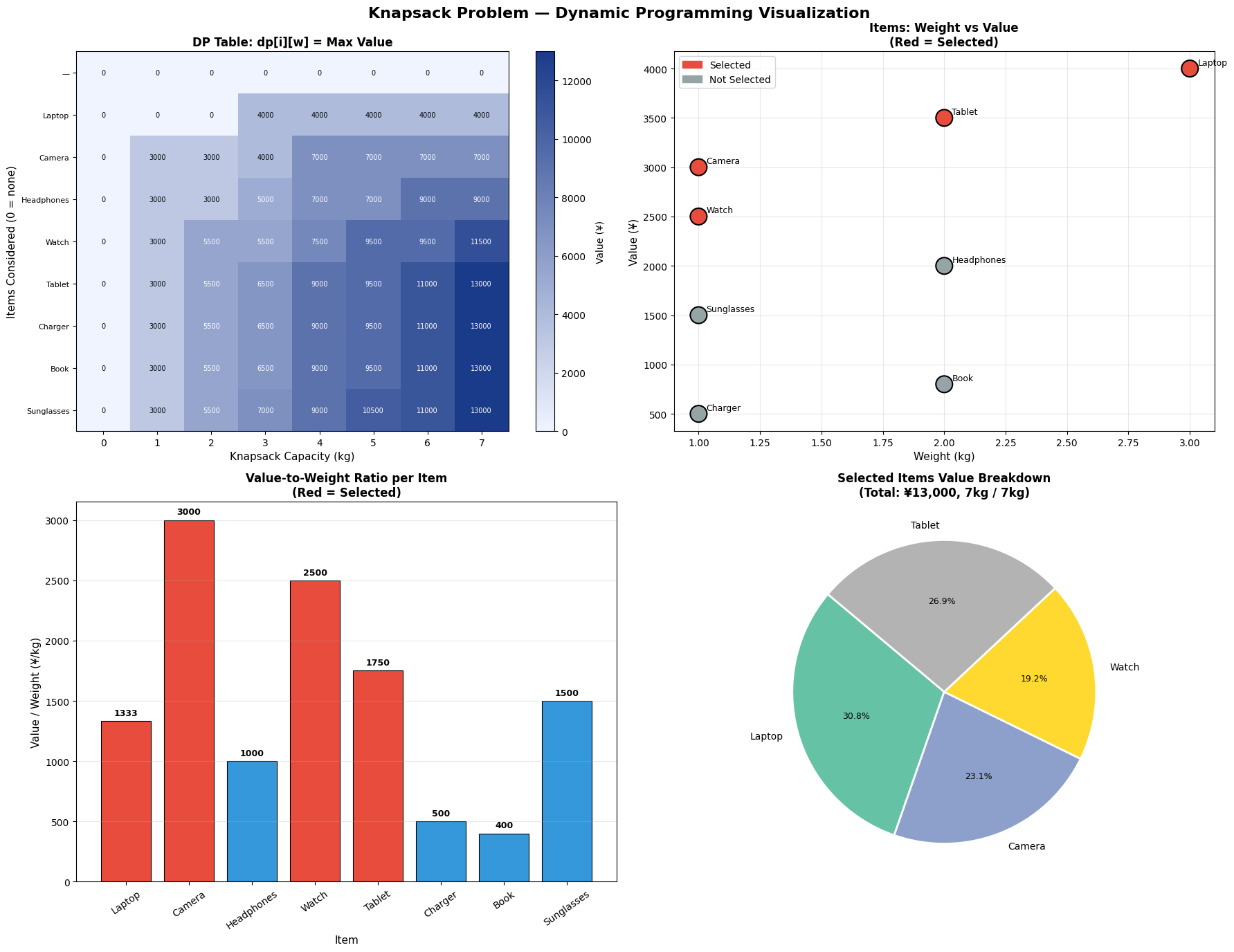
Panel 1 — DP Table Heatmap shows the full dp[i][w] matrix. Each cell represents the maximum value achievable using the first $i$ items with weight capacity $w$. The color gradient from light blue to dark blue shows how the optimal value grows as more items are considered and capacity increases. You can visually trace the “staircase” structure of the optimal solution.
Panel 2 — Weight vs Value Scatter plots every item by its weight and value. Items highlighted in red were selected by the algorithm. Notice that high-value, low-weight items (Camera, Watch, Tablet) cluster in the upper-left — these are the most attractive candidates.
Panel 3 — Value/Weight Ratio is the key insight into why certain items are chosen. Items with a higher ratio deliver more value per unit of weight. However, the greedy approach of always picking the highest-ratio item does not guarantee the global optimum — that’s exactly why we need dynamic programming.
Panel 4 — Pie Chart shows how each selected item contributes to the total optimal value of ¥{max_value}.
3D Visualization Code
1 | # ============================================================ |
Graph Explanation (3D Visualizations)
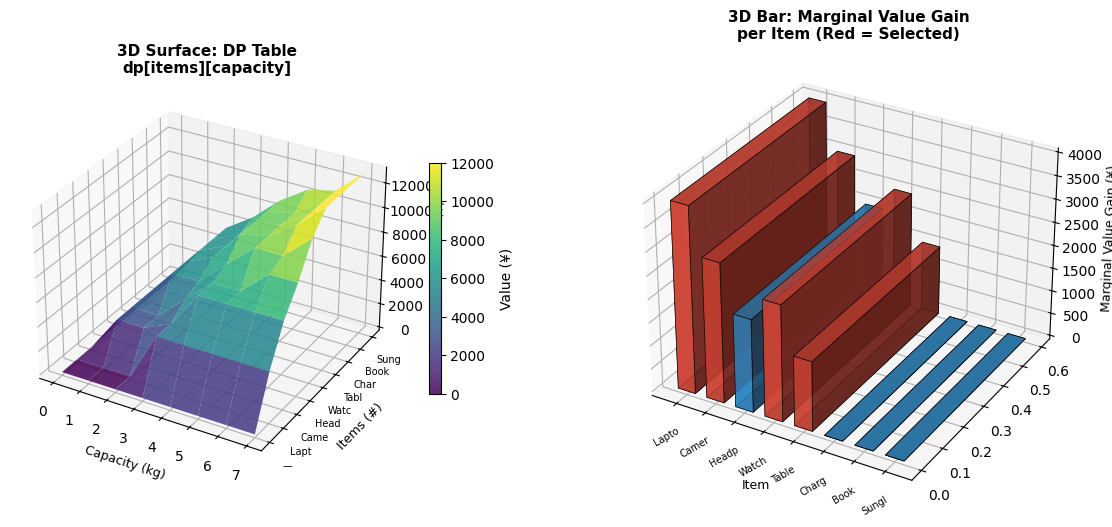
3D Surface Plot renders the entire DP table as a landscape. The $x$-axis is capacity, $y$-axis is the item index, and $z$-axis is the optimal value. The surface rises in discrete “steps” each time a valuable item is added — a beautiful geometric representation of the algorithm’s progression.
3D Bar Chart shows the marginal value gain each item contributes to the optimal solution at full capacity $W$. Formally:
$$\Delta_i = dp[i][W] - dp[i-1][W]$$
Red bars are selected items. Items with $\Delta_i = 0$ did not improve the optimal solution given the remaining capacity after higher-priority items were packed.
Sensitivity Analysis Code
1 | # ============================================================ |
Graph Explanation (Sensitivity Analysis)
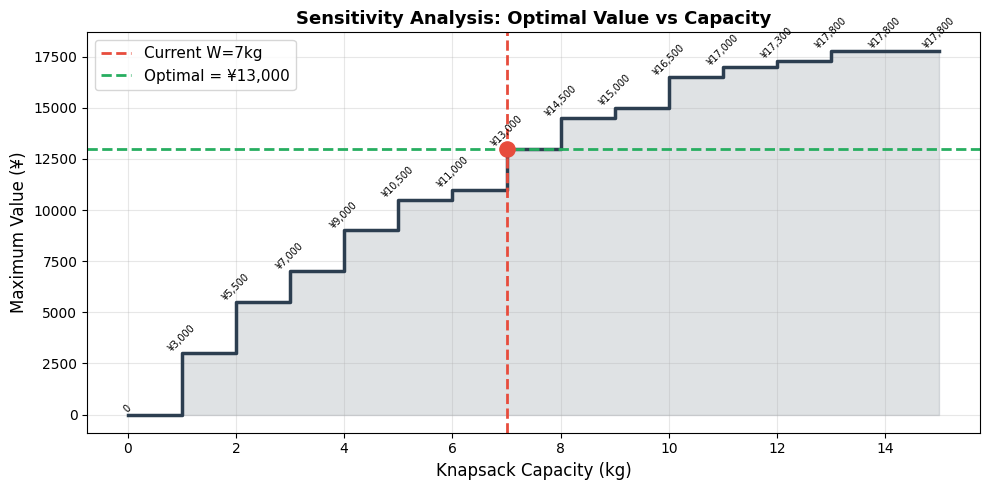
By solving the problem for every capacity from 0 to 15 kg, we get a step-function curve. Each “jump” in the curve corresponds to a point where adding more capacity allows an additional item to be packed. This is extremely useful in practice — for example, it tells you whether purchasing a slightly larger bag is worth the added cost. At $W=7$ kg our optimal value plateaus, meaning increasing capacity beyond a certain point yields diminishing returns given the available items.
Key Takeaway
The greedy approach (always pick the highest value/weight ratio) does not always give the optimal answer for the 0/1 knapsack. Dynamic programming guarantees the global optimum by systematically evaluating all subproblems — at the cost of $O(nW)$ time and $O(nW)$ space, which is perfectly tractable for practical problem sizes.